Making your CMS accessible is now a legal and practical necessity. With lawsuits rising and the European Accessibility Act in full effect since June 2025, organizations must prioritize compliance with accessibility standards like WCAG 2.1/2.2 Level AA. AI tools can simplify this process by automating tasks such as alt text generation, video captions, and color contrast fixes. However, AI alone isn’t enough - manual testing remains essential for addressing nuanced issues.
Key Takeaways:
- Automate repetitive tasks: AI can handle alt text, captions, and structural fixes, reducing manual effort.
- Align with standards: Focus on WCAG, ATAG, and Section 508 compliance to meet legal requirements.
- Vet tools carefully: Avoid accessibility overlays; prioritize tools that generate semantic HTML and integrate with your CMS.
- Combine audits: Use AI for speed but validate with manual testing for accuracy.
- Prevent regressions: Integrate accessibility checks into your development pipeline to catch new issues early.
AI Accessibility in CMS: Key Statistics and Compliance Data 2024-2025
Can Artificial Intelligence (AI) Audit and Remediate Websites for Accessibility?
Planning AI Accessibility in CMS
When incorporating AI into your CMS, it's crucial to focus on legal compliance and real-world accessibility needs without overcomplicating the process. This planning phase is essential for creating an accessible CMS setup from the ground up.
Align Accessibility Goals with Standards
The first step is to aim for compliance with WCAG 2.1 or 2.2 Level AA, as this is the standard referenced in most ADA lawsuits and required under the European Accessibility Act. Level AA ensures your CMS meets core accessibility principles: Perceivable, Operable, Understandable, and Robust.
For CMS-specific accessibility, ATAG 2.0 is critical. This standard ensures that the CMS interface itself enables content creators to produce accessible materials. If your organization works with U.S. federal agencies, you'll also need to account for Section 508 requirements.
"WCAG isn't just a best practice - it's often the measuring stick for legal compliance." - Greg McNeil, 216digital
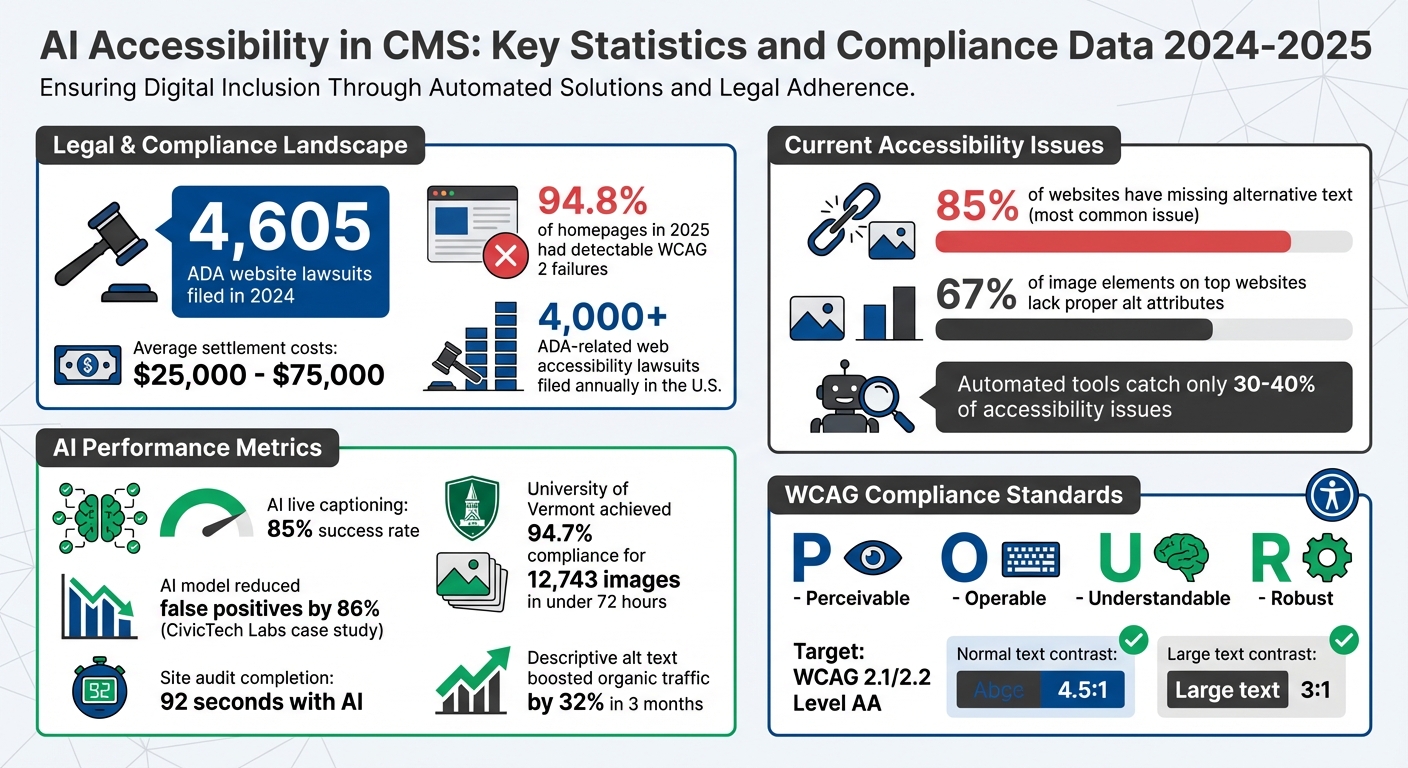
With over 4,000 ADA-related web accessibility lawsuits filed annually in the U.S., accessibility isn't just a technical concern - it’s a legal necessity. These standards will guide your choice of tools and implementation strategies.
Define AI Use Cases in CMS
Focus on high-impact tasks where AI can improve accessibility. For example, alt text generation for image libraries addresses a common issue affecting 85% of websites. AI can also assist with:
- Automating video captions
- Fixing color contrast issues
- Correcting heading structures
- Replacing vague link text like "click here" with descriptive alternatives
Each use case should align with specific WCAG success criteria. For instance, automated captioning supports 1.2.4 Captions (Live), while contrast fixes address 1.4.3 Contrast (Minimum). However, AI tools alone aren’t enough - manual testing is essential. Automated tools typically catch only 30% to 40% of accessibility issues, leaving the rest to be identified through hands-on testing with screen readers like NVDA or VoiceOver. Defining these use cases will shape your CMS configuration strategy.
Select and Vet AI Tools
When choosing AI tools, prioritize those that generate semantic HTML (e.g., correct use of <h2> tags and proper list formatting) instead of focusing solely on visual styling. Avoid accessibility overlays or widgets that promise instant compliance, as they often conflict with assistive technologies and could increase your legal risk.
"Accessibility overlays... are notoriously unhelpful as they do not produce standards-compliant code, and often conflict with existing website technology." - Digital Accessibility Office, Carnegie Mellon University
Look for tools that integrate with your CMS via APIs or plugins without altering its core functionality. Features like OCR (Optical Character Recognition) for text within images are also important. Resources such as the AI Blog Generator Directory (https://aibloggenerators.com) can help identify AI tools with CMS integration and accessibility features.
Before committing to a tool, test its output using automated scanners like Axe DevTools, Lighthouse, or WAVE, and follow up with manual validation using screen readers to ensure the content is accessible and meaningful. For example, in December 2025, VU Amsterdam implemented the Kontent.ai headless CMS, requiring structured content models that made accessibility metadata mandatory. This ensured all AI-generated content was reviewed by humans before publication. Once you've thoroughly vetted your tools, you'll be ready to configure them for accessibility.
Configure AI for Accessibility in CMS
Once you've chosen your AI tools, the next step is setting them up to handle specific accessibility tasks within your CMS. This configuration phase is key to improving your site's compliance with accessibility standards.
Automate Alt Text and Non-Text Content
Start by auditing your existing content using tools like WP Accessibility Helper or Screaming Frog to pinpoint images with missing or placeholder alt text. According to the 2023 WebAIM Million analysis, 67% of <img> elements on top websites lacked proper alt attributes.
Select an AI engine that aligns with your privacy and control requirements. Options include local inference, self-hosted APIs, or cloud-based services like Azure Image Analysis, Cloudflare Workers AI, or AltText.ai (starting at $5/month for 100 image credits). Use Contextual Prompting to provide the AI with additional context - such as surrounding HTML, post titles, and section headings - so the generated descriptions are specific and relevant to the image's purpose, rather than generic labels.
"AI-generated alt-text isn't about replacing human judgment - it's about eliminating the friction that prevents good judgment from being applied at scale." - Dr. Sarah Lin, Senior Accessibility Engineer, W3C Web Accessibility Initiative (WAI)
Create a Review Queue where AI-generated alt text can be reviewed, edited, or rejected by humans before it goes live. This is especially important for high-priority pages. Configure CMS plugins or webhooks to trigger AI generation whenever an image is uploaded. For complex visuals like charts and infographics, set up the AI to generate a concise alt attribute while linking to a detailed description using aria-describedby or a <details> element.
To maintain quality, establish confidence thresholds - only auto-accept captions that meet a specific confidence score (e.g., 0.4 for older APIs or 0.0 for newer gender-neutral models). Ensure the AI preserves empty alt attributes (alt="") for decorative images, preventing screen readers from announcing irrelevant filenames.
Improve Content Structure and Visual Design
Once alt text automation is in place, use AI to enhance your site's content structure and visual design. Leverage Natural Language Processing (NLP) to analyze content hierarchies, ensuring proper heading levels (H1–H6) and logical reading orders. AI-powered editors like CKEditor 5 can generate semantic HTML by default and flag heading hierarchy errors in real-time.
Configure AI to evaluate color contrast ratios across your site, identifying non-compliant combinations and suggesting alternatives that align with your brand's design. The minimum recommended contrast ratios are 4.5:1 for normal text and 3:1 for large text. Incorporate automated accessibility checks into your continuous integration and deployment pipelines to catch design or structural issues before they reach production.
For headless CMS setups, embed accessibility requirements directly into your content models. For example, make fields like transcripts or compliance metadata mandatory.
Improve Media and Language Accessibility
AI can also enhance media and language accessibility. Integrate speech-to-text services into your CMS workflow to automatically generate transcripts for video and audio uploads. These tools can identify multiple speakers and handle specialized terminology.
If your site supports multiple languages, use plugins that detect the post's language and generate corresponding accessibility metadata. Many AI tools support over 130 languages. Enable Optical Character Recognition (OCR) to extract text embedded in images or video frames. Additionally, configure NLP tools to flag content that exceeds a specific reading grade level to improve cognitive accessibility.
For example, in February 2026, the University of Vermont's Office of Digital Accessibility tackled a backlog of 12,743 historical images across 89 departmental sites. By deploying a local AI model (LLaVA:13b) via Ollama with custom prompts, they achieved 94.7% compliance for image alt text in under 72 hours, saving approximately 320 staff hours.
sbb-itb-a759a2a
Run AI-Powered Accessibility Audits
Once your AI tools are set up, create a regular schedule for audits to identify accessibility issues before they impact users. While automated tools like Lighthouse and axe-core are helpful, they only catch about 30% of actual accessibility problems. To cover the gaps, combine the speed of AI with the insight of human reviewers.
Combine Automated and Manual Audits
Begin with automated tools like axe-core, Lighthouse, or WAVE to establish a baseline. These tools are excellent for spotting technical issues such as missing alt text, poor color contrast, or heading structure errors. However, they often miss more complex issues, like keyboard navigation flows or screen reader functionality. To make the results actionable, export JSON outputs and use a large language model (LLM) to translate WCAG codes into clear, prioritized tasks.
AI can also help audit custom interactive components by ensuring proper ARIA attributes and keyboard functionality. For instance, in January 2024, CivicTech Labs used a fine-tuned local AI model to reduce false positives by 86% and complete a site audit in just 92 seconds.
"Automated tools consistently fail on dynamic form validation. They see an empty input and declare 'no error message present' - ignoring that the error appears only after submission... A local model, given the full DOM + interaction context, can verify the announcement timing, role, and relationship - something regex-based checkers cannot do." - Dr. Lena Torres, Accessibility Research Lead, W3C WAI Task Force
While AI can streamline the process, always validate its findings with manual testing. This is especially critical for areas like dashboards or forms, where many accessibility issues occur. Combining AI insights with human expertise ensures thorough and accurate results.
Track and Resolve Accessibility Issues
Set up an issue tracker that categorizes problems by severity (Critical, High, Medium, Low). Track the number of issues resolved versus those still open, and monitor how long it takes to fix critical defects. This helps measure your team's efficiency.
Focus your audits on high-priority areas like high-traffic pages, key user flows (e.g., login and checkout), and unique templates. Rather than trying to address every page, this targeted approach ensures maximum impact. Assign responsibilities clearly - content teams can manage readability and alt text, while design teams handle component patterns. Keep an eye on your overall accessibility score to identify improvements or regressions during CMS updates.
Start by achieving a "zero-error score" on automated scans before diving into manual audits. Track page-level changes linked to specific code releases or content updates to pinpoint the source of any regressions. This is especially crucial given that 94.8% of homepages in 2025 had detectable WCAG 2 failures, with missing alternative text being the most common issue, found on 85% of websites.
Monitoring these trends not only validates your current efforts but also helps refine your approach for future updates.
Prevent Accessibility Regressions
Once you've resolved existing issues, the focus shifts to preventing new ones. Integrate automated accessibility scans into your CI/CD pipeline to catch problems early. Tools like jest-axe or Lighthouse CI can block builds if new violations are detected. This proactive approach catches bugs before they go live, saving time and reducing legal risks.
Re-audit content after major updates, theme changes, or plugin installations. Even small changes can disrupt accessibility features, making continuous monitoring vital. Configure your pipeline to run scans on every pull request, not just on production deployments.
With 4,605 ADA website lawsuits filed in 2024 and average settlements ranging from $25,000 to $75,000, the cost of prevention is far less than the cost of fixing issues after the fact. Always maintain detailed audit logs of AI-generated fixes, and have them reviewed by a human expert to ensure compliance and accountability.
Maintain Compliance and Continuous Improvement
Keeping your CMS compliant as content evolves demands structured processes and a well-aligned team. With 4,605 ADA-related website lawsuits filed in 2024 and settlement costs ranging from $25,000 to $75,000 on average, accessibility is not a one-and-done task - it’s a continuous effort.
Map AI Checks to WCAG Principles
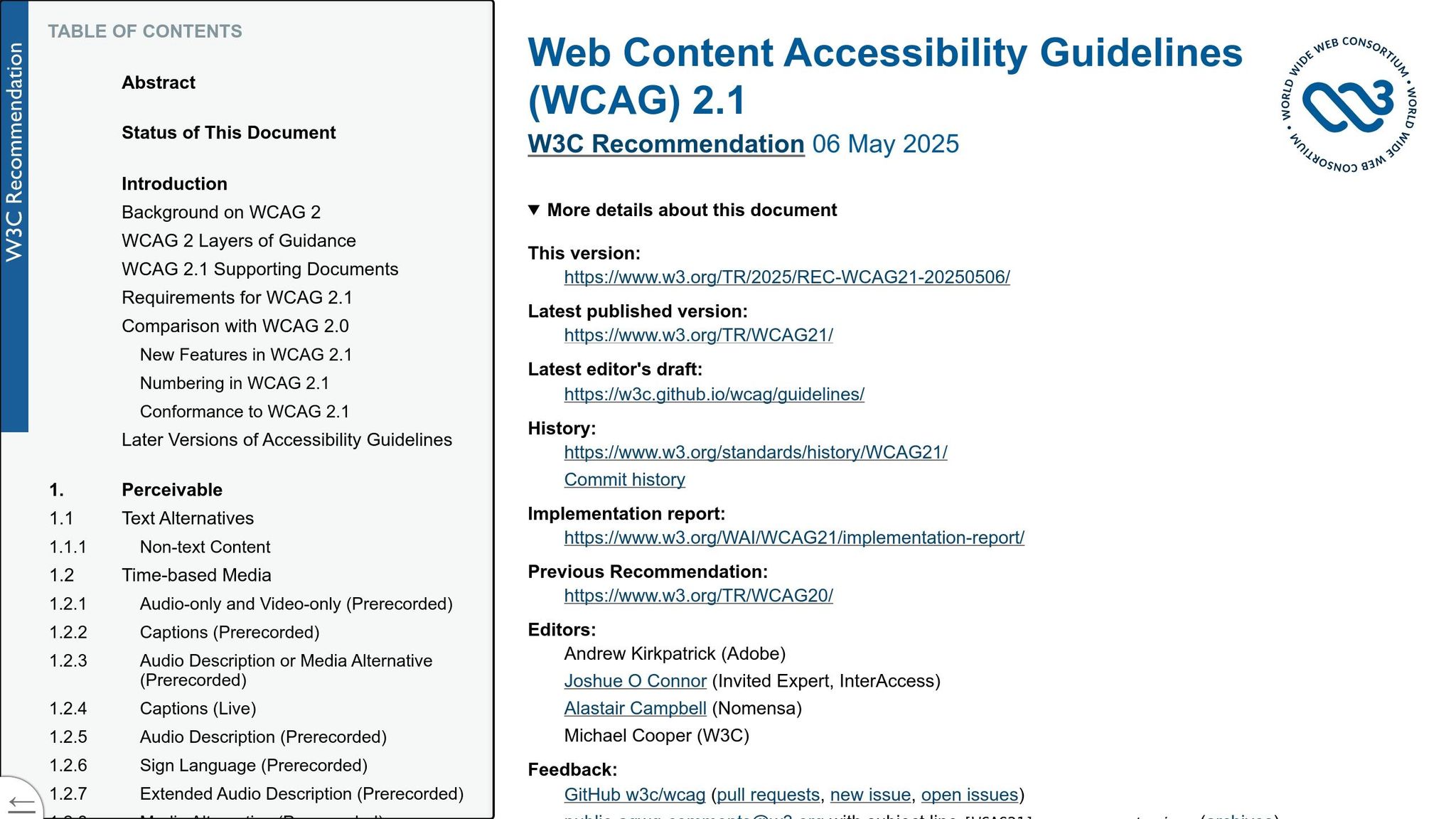
To streamline accessibility, align your AI tools with WCAG’s four key principles - Perceivable, Operable, Understandable, and Robust (POUR). For Perceivable content, AI can automate tasks like generating alternative text (SC 1.1.1), providing live captioning with an 85% success rate (SC 1.2.4), and fixing color contrast issues on the fly (SC 1.4.3). Under the Operable principle, AI helps flag vague links like "click here" and suggests clearer alternatives (SC 2.4.4), while also identifying keyboard navigation issues.
When it comes to Understandable content, AI simplifies complex text into plain language at an 8th-grade reading level (SC 3.1.5), organizes heading structures (SC 1.3.1), and detects language changes that could disrupt screen readers (SC 3.1). For Robust content, AI generates semantic HTML and applies proper ARIA roles when native HTML doesn’t suffice, ensuring compatibility with assistive technologies. However, always validate AI outputs to ensure they make sense and align with the context, especially when applying WCAG principles.
Once your WCAG-based checks are in place, document these processes and configurations to ensure consistency across your team.
Document Policies and Configurations
Clear documentation is vital for aligning your team on how AI is used to meet accessibility standards. Create guidelines that outline rules for AI-generated elements like headings, alt text, link labels, and color formatting. Develop a library of "accessible prompts", such as "Write at an 8th-grade level with clear headings and descriptive links", to ensure AI-generated drafts meet accessibility requirements from the outset.
Incorporate accessibility standards directly into your CMS by making fields like alt text or transcripts mandatory before publishing. Define hybrid workflows where AI provides a baseline, and human editors refine the content for context and brand alignment. Tagging AI-generated content in your system can also help schedule human reviews for quality assurance.
Since automated tools catch only 30% to 40% of accessibility issues, assign clear responsibilities for manual reviews as part of your publishing process. These documented policies are especially important for legal defense, as courts often rely on WCAG standards to assess ADA compliance, whether the content is human- or AI-generated.
Once policies are in place, focus on training your team and refining your practices.
Train Teams and Update Practices
Accessibility training should be tailored to the specific roles within your team. Developers need to run accessibility checks before code reviews, designers should verify color contrast and touch targets during the design phase, and content creators can use AI tools for tasks like writing alt text and structuring headings. Reinforce that AI is a helpful tool but not a substitute for manual testing - screen readers like NVDA, JAWS, or VoiceOver remain critical for identifying usability issues.
Maintain an internal knowledge base with approved design documents, finalized policies, and a log of past accessibility issues.
"AI systems are only as good as the sources you allow them to reference and ground their answers in. This is not about retraining foundation models; it is about carefully controlling which materials the AI is allowed to draw from." – Ted Drake, Accessibility Leader
Integrate AI checks into your CI/CD pipeline and use real-time monitoring to catch regressions as they happen. For example, adding descriptive alt text to product images can boost organic traffic from image searches by 32% in just three months. Additionally, involve people with disabilities in user research and testing to uncover usability barriers that automated tools might miss.
Conclusion
AI is making strides in improving CMS accessibility by automating repetitive tasks, but it still relies on human expertise to tackle more nuanced challenges. Automated tools can identify some issues, like basic alt text generation or color contrast problems, but they only scratch the surface. That's why manual testing using tools like NVDA, JAWS, or VoiceOver remains essential.
The stakes are high when it comes to accessibility. With 4,605 ADA-related lawsuits filed in 2024, meeting accessibility standards isn't optional - it requires consistent effort. AI can handle large-scale tasks efficiently, such as generating initial alt text, flagging contrast issues, or creating automated captions with about 85% accuracy. However, human editors are critical for refining the context, ensuring alignment with brand guidelines, and testing interactions that AI can't fully evaluate.
"AI tools excel at scale, speed, and consistency, but they lack the contextual understanding and nuanced judgment that humans bring." – Zaneta Styblova, Kontent.ai
This underscores the need to integrate AI with thorough human oversight. Start by building accessibility into your CMS workflow from the ground up. For example, make fields like alt text mandatory, incorporate AI checks into your CI/CD pipeline, and perform regular audits to catch issues before they escalate. Documenting policies, training your team on both AI tools and manual testing, and maintaining a knowledge base of past challenges can streamline future improvements.
Finding the right AI solutions can feel overwhelming in a constantly changing landscape. Resources like the AI Blog Generator Directory (https://aibloggenerators.com) can help you identify tools tailored to specific needs - whether it's automated captioning, color contrast analysis, or CMS-integrated accessibility checks. By combining reliable tools with structured workflows, you can create content that’s inclusive for all users while reducing legal risks.
FAQs
What should we automate with AI first in our CMS?
Start by simplifying content creation and publishing workflows in your CMS. Prioritize automating tasks like content publishing, setting up internal links, and embedding prompts for large language models (LLMs). These steps help cut down on manual work and speed up the entire content delivery process. You can also incorporate AI tools to handle content optimization, tagging, and governance, ensuring your content stays efficient and consistent across the board.
How can we prove WCAG 2.2 AA compliance when using AI?
To meet WCAG 2.2 AA compliance with the help of AI, it's important to follow a thorough checklist that addresses all 86 success criteria, including the newly added requirements. Start by using automated tools to evaluate AI-generated content for potential issues such as alt text, color contrast, and semantic structure.
When problems are identified, document the fixes and ensure that critical features - like keyboard accessibility and proper use of ARIA roles - align with the standards. Regular audits and sticking to established best practices are key to maintaining compliance over time.
What manual tests are still required after AI accessibility checks?
After running AI accessibility checks, it's important to follow up with manual testing to ensure everything meets accessibility standards like WCAG. Here are the key steps:
- Check heading structure: Make sure headings are organized logically and follow a proper hierarchy (e.g., H1, H2, H3).
- Verify alt text: Confirm that images include descriptive alt text that accurately conveys their purpose or content.
- Test keyboard navigation: Ensure users can navigate the site fully using only a keyboard, without getting stuck or encountering inaccessible elements.
- Conduct screen reader tests: Use a screen reader to verify that the content is readable and flows naturally for users relying on assistive technology.
These manual steps help catch issues that automated tools might miss, ensuring a more accessible experience for everyone.