AI-driven archiving is transforming how content is managed in CMS platforms. Instead of relying on manual processes, AI automates classification, improves compliance, and enables natural language search. Here's what you need to know:
- Efficiency Gains: Tasks that once took days can now be completed in minutes.
- Compliance Made Easier: AI helps meet regulations like GDPR and HIPAA by detecting sensitive data and applying retention policies.
- Content Optimization: Automating archiving improves system performance by up to 30% and boosts ROI by 68%.
- Advanced Tools: AI-powered platforms use structured data to handle dynamic content, from personalized user journeys to chatbots.
- Human Oversight: AI works as an assistant, streamlining workflows while professionals ensure accuracy.
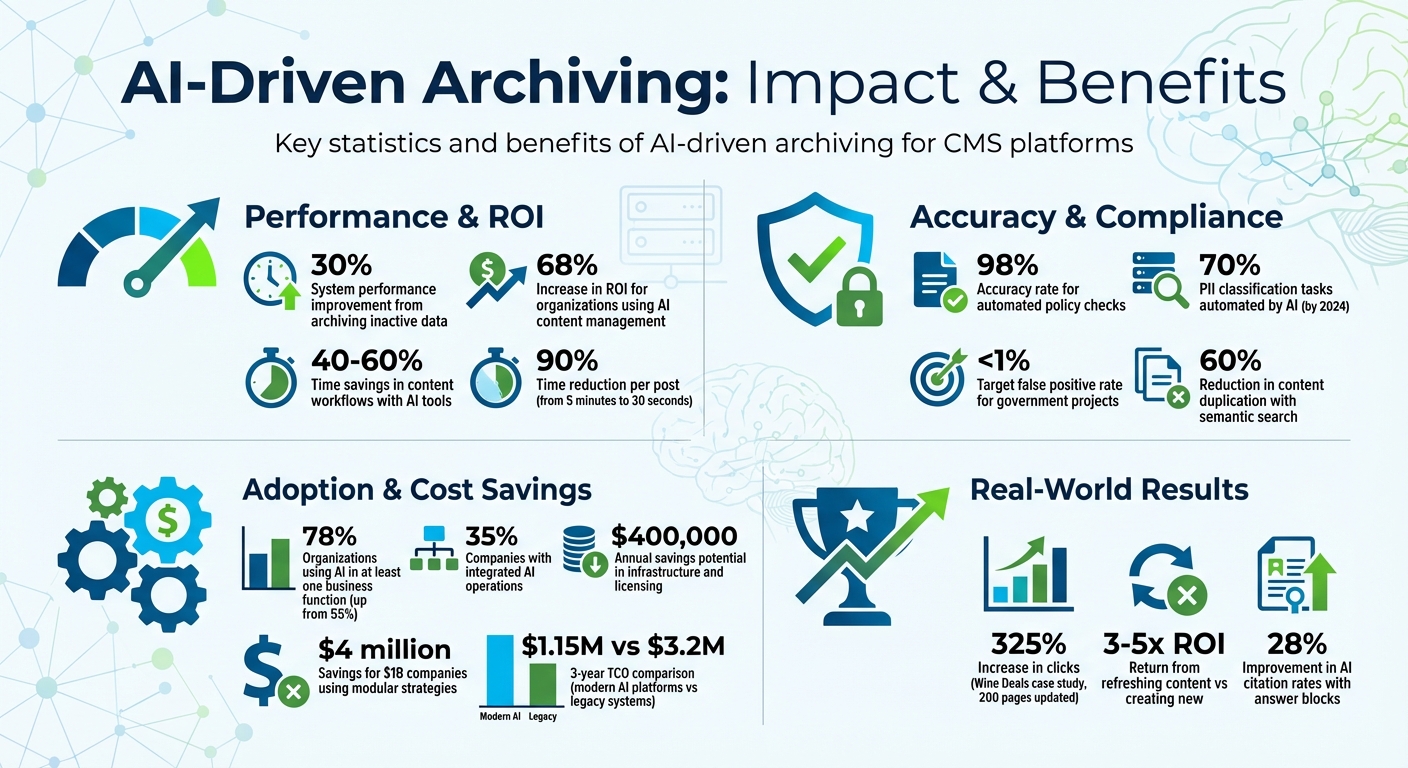
AI-Driven Archiving: Key Statistics and ROI Benefits for CMS
Preparing for a Records Management Future with AI | Gravity Union

sbb-itb-a759a2a
Building Your AI Archiving Strategy
A solid plan is the backbone of any successful AI-driven archiving effort in your CMS. Before diving into AI tools, lay out a clear roadmap. A well-thought-out strategy ensures your archiving aligns with your business goals. The key to success lies in defining objectives and selecting tools that work seamlessly with your existing infrastructure.
Set Clear Archiving Goals
Start by identifying your main priorities. For many, storage optimization is a top concern. Archiving inactive data can improve system performance by up to 30%. This typically means moving redundant or low-value content to cost-effective storage solutions like cloud services or tape archives, which can significantly reduce operational costs.
Regulatory compliance is another major driver. For example, HIPAA requires medical records to be safeguarded for at least six years, while European organizations must adhere to GDPR rules for data retention and personal information detection. AI can simplify compliance by automating the detection of sensitive data (PII) across large datasets, flagging issues before they escalate. Beyond compliance, content governance - like removing outdated or duplicate content - keeps your CMS clean and improves its overall health, which translates to better customer satisfaction.
"A happy content life cycle includes an archiving and deleting strategy."
– Team CSI, Content Strategy Inc.
Define content states clearly. For instance, "Current" refers to actively used content, "Archived" means content retained online for reference, and "Legacy" refers to deleted content stored in corporate repositories. Organizations leveraging AI for content management report a 68% increase in ROI, especially when they set measurable goals - like tracking how often AI-generated drafts are accepted with minor edits or the amount of staff time saved per record.
With your goals in place, the next step is selecting AI tools that align with your system.
Select Compatible AI Tools
Compatibility is critical when choosing AI tools for archiving. First, ensure the tools support your CMS data formats. For example, JSON works well for APIs and chatbots, while JSON-LD improves SEO and discoverability. On the other hand, unstructured HTML can make it harder for AI to process content effectively.
Focus on tools with features tailored to archiving needs. These might include PII detection for compliance, automated transcription for audio and video files, or duplicate image removal to cut storage costs. Integration depth also matters. Native integrations (e.g., dotAI for dotCMS) typically take 3–4 weeks to implement, whereas custom API connections can take 12–16 weeks. Tools like Preservica use a credit system: one credit covers tasks like PII detection for a single asset or OCR for one page, while eight credits handle one minute of audio/video transcription.
Governance is another essential consideration. Look for tools with "Enrichment Policies", which allow administrators to control what the AI can access, minimizing the risk of exposing sensitive data. Additionally, maintain an audit trail that distinguishes between human edits and AI changes - this not only ensures regulatory compliance but also builds trust. When implemented strategically, AI tools can deliver 40–60% time savings in content workflows, especially when structured outputs are combined with human oversight for quality assurance.
Automating Content Classification and Archiving
Once your tools and strategy are ready, it's time to let AI handle the heavy lifting of content classification and archiving. By automating these processes, you can eliminate the tedious task of manually sorting through thousands of items while maintaining the precision your organization requires. After ensuring accurate classification, the next step is to define clear rules for automated archiving.
Use AI Algorithms for Content Classification
A structured approach is crucial for effective AI classification. Start by organizing your content into distinct, semantic fields - for example, separating product descriptions from technical specifications. This structure helps AI analyze and categorize content consistently across your CMS.
By blending rule-based logic, machine learning, and natural language processing (NLP), AI can categorize content more effectively. For instance, NLP can differentiate between a customer complaint and a neutral inquiry, even if both mention the same product.
A practical example comes from the Institute of Chartered Accountants in England and Wales (ICAEW). They used OpenAI's GPT models to generate metadata for thousands of archived assets. By normalizing everything into PDF format and processing only the first and last pages of lengthy documents, they managed API costs while making previously overlooked webinars fully searchable.
"AI serves as an assistant, not as a replacement for professional judgement. AI is now doing the heavy lifting... while humans focus on checking and approving."
– Craig McCarthy, Digital Archive Manager, ICAEW
If you're implementing LLM-based classification, consider creating a "cataloging manual" for the AI. This should include clear task definitions, the AI's role, schema requirements (like Dublin Core), and specific examples. It's also essential to set performance benchmarks before deployment - government projects, for instance, often aim for less than a 1% false positive rate to avoid accidental deletion of critical records.
AI-driven tools are expected to automate 70% of personally identifiable information (PII) classification tasks by 2024, with automated policy checks achieving up to 98% accuracy. However, human oversight remains vital - especially for records with legal or cultural significance. Professionals must review and approve AI-generated tags to ensure accuracy.
Create Automated Archiving Rules
Developing effective archiving rules requires combining multiple layers of logic. Start with straightforward parameters like content age, last-modified dates, or page view counts. Then, use machine learning to identify patterns, such as seasonal content that loses relevance after specific dates, and NLP to grasp context - for instance, distinguishing between a still-relevant press release and an outdated one.
Before applying rules, test them in a simulation mode using historical data. This allows you to refine conditions and measure their impact without actually moving or deleting files. Using adaptive scopes with dynamic queries ensures new users or sites are automatically included, maintaining consistent policy application as your organization grows.
In 2022, the UK Cabinet Office Digital KIM team implemented an automated document review tool to handle a legacy repository of 12 million documents. By encoding a custom lexicon and weighting rules based on document format and location, they reviewed over 5 million items and deleted 1.5 million redundant, trivial, and outdated (ROT) records. This initiative was one of the first to follow the Algorithmic Transparency Recording Standard.
To safeguard sensitive content, enforce granular controls. Use "Enrichment Policies" to limit AI access to specific folders, security tags, or sensitivity levels. For example, AI might process marketing materials but be restricted from accessing HR or financial documents. Detailed audit trails are also essential - they should log the date, title, and reason for every automated action, creating a defensible record for audits and regulators.
The table below highlights how specific archiving rules can improve compliance and streamline workflows:
| Archiving Condition | Best Use Case | Compliance Benefit |
|---|---|---|
| Sensitive Info Types | PII, PHI, Financial records | Automates HIPAA/GDPR compliance |
| Trainable Classifiers | Complex categories (e.g., "Legal", "HR") | Identifies intent beyond keywords |
| KeyQL Queries | Specific projects or file types | Precise targeting for FOIA/audits |
| Cloud Attachments | Teams/Outlook shared files | Captures "modern attachments" for eDiscovery |
To ensure compliance from the start, apply default retention and archiving rules when new SharePoint sites or email accounts are created. Tailor these rules based on the team's role or organizational importance. By integrating these steps into your broader AI archiving strategy, you'll achieve both efficiency and adherence to regulations.
Keeping Archived Content Accessible and Functional
Archived content can lose its value if it becomes difficult to access or use. To keep it relevant, you need to ensure it remains functional, searchable, and compliant for both users and search engines. Neglecting this can lead to issues like broken links, missing metadata, and inaccessible media - problems that hurt both your SEO and user experience.
Maintain Link Integrity
Broken links in archived content can frustrate users, harm your SEO, and damage your credibility. Top AI tools for writing and blogging can help by scanning for broken or redirected links and suggesting fixes, such as updating anchor text to something more descriptive. For instance, a tool might flag outdated anchor text like "guide" and recommend a more precise alternative that fits current usage trends.
Stability is key when it comes to URLs. Keeping URIs consistent during archiving prevents "link rot" and ensures bookmarks and inbound links still work. If you must change URLs, use permanent HTTP 301 redirects to point directly from the old address to the new one. Avoid redirect chains, as these can slow down page loading times and confuse search engine crawlers. A detailed 1:1 redirect map is essential for tracking every old URL and its updated destination.
"The stability of a website's URI over time makes it possible to view website captures from 1997 to present in a single unbroken timeline."
– Library of Congress
Preflight checks can catch issues like missing metadata, broken images, or schema errors before content is archived permanently. Also, be mindful of your robots.txt file. While excluding CSS and JavaScript directories might seem like a good idea for search indexing, archival crawlers rely on these files to accurately replicate your site’s appearance and functionality.
Retain Metadata and Tags
Metadata plays a crucial role in keeping archived content discoverable. It provides the context that helps users and search engines find and understand your content long after it’s been published. AI tools using Natural Language Processing (NLP) can simplify this process by automatically identifying keywords, recognizing entities like names or places, and categorizing topics across large archives.
"If OCR gives archives a voice, metadata gives them context. It's the difference between having a library of words and having a library that knows what those words mean."
– Umang Dayal, Digital Divide Data
To maintain consistency and compatibility, use controlled vocabulary lists and standardized schemas in open formats like XML or PDF/A. When migrating content, conduct a full SEO audit and export all metadata to ensure an accurate transfer. This includes retaining page titles, meta descriptions, header structures (H1, H2), and structured data formats like JSON-LD.
AI can also help with accessibility by generating alt text and descriptions for archived media, ensuring compliance with long-term accessibility standards. Regularly schedule audits - ideally monthly - to update metadata based on changing search behaviors. Once content is archived, submit updated sitemaps to search engines to monitor for crawl errors or spikes in 404 pages.
Using AI Analytics for Archive Management
Keep a close eye on your archived content to ensure it continues to perform well and meets compliance standards. By integrating AI analytics into your archiving strategy, you can turn your archive from a static storage space into a dynamic resource. AI writer tools help you identify what’s performing, what’s losing relevance, and what needs immediate attention. Without regular monitoring, you might miss out on reviving valuable content or fail to meet changing regulatory demands.
Run Regular Archive Audits
AI-powered audits can review thousands of archived pages in a fraction of the time it would take manually. These audits help identify content that’s weak, outdated, or redundant. Focus on key metrics like organic traffic, impressions, average search position, and click-through rates to spot early signs of content decline. Check whether archived pages still appear in AI Overviews, featured snippets, or "People Also Ask" sections, as these features now favor fresh, well-structured content.
For compliance, AI tools can be used to flag sensitive information accurately. To ensure reliability, monitor the accuracy of flagged items by comparing true positives (correctly identified) against false positives (incorrectly flagged). Ideally, the false positive rate should stay below 1% to avoid mistakenly discarding valuable records.
"AI can support archival work, but only when collections are made 'AI-ready' through careful preparation, documentation, and governance."
– Prof. Giovanni Colavizza and Prof. Lise Jaillant
A scoring system can help rate archived content on factors like SEO visibility, topical relevance, freshness, and E-E-A-T signals (Experience, Expertise, Authoritativeness, and Trustworthiness). Visualize these scores on an impact-versus-effort matrix to identify quick wins - tasks like updating meta descriptions or adding FAQ schema to archived pages that still hold value. Conduct these audits monthly to stay aligned with shifting search trends and compliance needs. Beyond compliance, these insights also reveal opportunities to refresh and repurpose high-performing content.
Repurpose High-Value Archived Content
Audit results can uncover archived content with untapped potential, ready to be repurposed. Refreshing content often delivers 3–5 times the ROI of creating new material, as it builds on existing authority and backlinks. For example, Wine Deals used AI analytics to audit and update 200 high-intent pages, leading to a 325% increase in clicks within just three months.
Spotting decay patterns in your analytics is crucial. If organic traffic drops despite stable rankings, it’s a sign your content needs updated data or deeper coverage of the topic. On the other hand, steady traffic but declining conversions could mean it’s time to refine your calls-to-action or offers. Lost visibility in featured snippets or FAQs? Rework your page structure and schema markup to regain traction. AI tools can also identify "near-miss" content - pages with strong impressions but low click-through rates - as prime candidates for updates that yield high returns.
Use a decision matrix to determine the best course of action for archived content:
- Refresh: For pages with high traffic or conversions.
- Consolidate: Combine overlapping topics into a single, stronger page.
- Redirect: Point negligible traffic pages to better-performing versions.
- Sunset: Retire outdated or irrelevant content.
For high-value posts, consider adding concise answer blocks - 60–80 words placed early in the content - to improve AI citation rates by as much as 28%. Instead of large-scale quarterly updates, let AI flag the top 10 URLs with the sharpest traffic decline each week for focused updates.
| Decay Type | Key Symptoms | Typical Priority Action |
|---|---|---|
| Traffic Decay | Falling organic sessions, stable/lower rankings | Refresh with updated data and richer coverage |
| Conversion Decay | Steady traffic, declining conversion rate | Refine offers, UX, and calls-to-action |
| SERP Feature Loss | Lost featured snippet or FAQ visibility | Rework structure, FAQs, and schema markup |
| Stagnant Potential | Strong impressions, weak CTR | Test new titles and meta descriptions |
Source: Single Grain
Connecting AI Archiving Tools with Your CMS
Integrating AI archiving tools with your CMS requires aligning technical requirements with your workflow. This connection has become increasingly important as data grows and compliance demands intensify. With 78% of organizations now using AI in at least one business function - up from 55% the previous year - knowing how to integrate these tools is a vital skill. The following steps outline how to connect AI tools with your CMS to create a streamlined archiving process.
Start by conducting a technical audit. Check your server load, response times, and storage capacity. Identify outdated plugins or custom components, and clean up any content errors, redundancies, or broken links to ensure your data is ready for AI processing. Poor-quality data can lead to inaccurate insights, so this step is crucial before exposing your CMS to AI models.
"Traditional CMS platforms must evolve to support Git-like branching, precise rollback controls, and configuration tracking, ensuring both content stability and site integrity."
– Dries Buytaert, Creator of Drupal
Ensure zero-trust API security by using granular permissions and scoped tokens, so AI agents only access the data they need. Verify compliance with regulations like GDPR, HIPAA, and DPDPA, and review your content storage and audit processes. Given that the average cost of a data breach reached $4.88 million in 2024, compliance isn't just about avoiding fines - it’s also a financial safeguard. By integrating AI tools thoughtfully, you can ensure your CMS and archiving systems work together effectively.
Choose CMS Platforms with Native AI Features
Some CMS platforms come with built-in AI capabilities, making them the easiest option for AI-driven archiving. These features integrate directly into your workflows, require minimal setup, and often include built-in audit tools. This eliminates the need for multiple API connections or reliance on third-party services, reducing the risk of downtime.
"CMSs with native, auditable AI capabilities simplify governance and reduce integration debt."
– Alejandro Cordova, Software Engineer
Native AI tools work best when your CMS supports configuration as code instead of relying only on a user interface. This allows AI to suggest validation rules, generate schemas, and refine content models. Platforms that support machine-readable formats like JSON, JSON-LD, Markdown, and XML enable AI to better understand and process your content. However, native features can be limiting - they depend on what the vendor offers and may not support specialized AI models or custom workflows.
Look for CMS platforms with event-driven architecture for archiving tasks. This ensures that AI processes like metadata generation and content classification run independently, without slowing down your CMS. AI-driven semantic search can reduce content duplication by 60%. Some platforms even include built-in tools and embedding APIs, potentially saving up to $400,000 annually in infrastructure and licensing costs. When native options fall short, third-party tools can provide the flexibility you need.
Add Third-Party AI Tools
Third-party AI tools offer greater flexibility and allow you to adapt as technology evolves. These tools connect to your CMS via API integrations, enabling real-time communication with external AI providers like OpenAI or Google Cloud. They’re ideal for advanced features like natural language processing or custom classification models that your CMS might not support.
For example, in 2025, the travel-tech startup loveholidays used AI to scale their hotel descriptions from 2,000 to 60,000 without increasing their content team. By automating repetitive writing tasks, they improved the quality of long-tail offerings and boosted conversion rates. Similarly, Complex Networks implemented an AI-driven recommendation system to link products to editorial content, saving editors significant time.
Start small with a phased rollout, focusing on AI content optimization techniques like tagging, alt-text generation, and metadata updates to show quick results. Currently, 35% of companies have integrated AI into their operations, with 42% actively exploring it. Automating repetitive tasks can cut the time spent per post from 5 minutes to just 30 seconds - a 90% time savings.
"The companies succeeding with AI don't start with 'How do we AI?'. They start with 'What's blocking our team?'"
– Sanity.io
Treat AI as a "junior assistant" rather than a replacement. Human editors should review and approve AI outputs to maintain brand voice and accuracy. When using AI for archiving, enable "training only" settings so the AI can learn from your content without exposing sensitive data. Implement branch-based versioning for content and site configurations so AI-driven changes can be reviewed, merged, or rolled back without losing human work.
For those exploring AI tools, the AI Blog Generator Directory offers a curated list of AI writing tools with CMS integration capabilities. Train your team on prompt engineering and API basics to maximize their effectiveness. Keep an eye on API uptime, as delays can disrupt your archiving process.
| Integration Method | Best Use Case | Key Benefit |
|---|---|---|
| API Connections | Linking external AI vendors (e.g., OpenAI, Google Cloud) | Real-time data transfer and robust security |
| Embedded Models | Real-time tasks like content moderation or photo classification | Immediate responses without external server dependency |
| Custom Solutions | Unique workflows or highly regulated industries | Tailored to specific business objectives and legal needs |
Conclusion
This checklist of AI-driven archiving best practices brings together the strategies outlined earlier. With AI, your CMS transforms from a simple storage tool into a dynamic content management engine. By automating tasks like tagging, metadata generation, and alt-text creation with AI tools for SEO-friendly blog creation, AI takes over the repetitive work, allowing your team to focus on more strategic initiatives. Companies leveraging AI for content management have reported improved ROI.
The real strength lies in pairing automation with thoughtful governance. Structured, semantic content enables AI to perform with precision, while tools like Git-style versioning and review queues ensure human oversight remains intact. This combination reduces the risk of AI errors while maintaining the speed and efficiency that AI offers. Together, this balance streamlines workflows and delivers measurable financial advantages.
"Generative AI is not really an AI problem. It's a content management problem. The hard part is no longer creating content. The hard part is managing it."
– John Williams, Co-CEO & CTO, Amplience
The financial impact goes beyond just boosting productivity. Semantic search can reduce content duplication by 60%, and adopting modular strategies can save companies earning $1 billion annually as much as $4 million. Furthermore, the average 3-year total cost of ownership for modern AI-driven platforms is $1.15 million, significantly less than the $3.2 million required for older systems that demand extensive infrastructure and ongoing dev-ops support.
FAQs
How do I decide what content to archive versus delete?
To keep your site organized and improve SEO, archive content that might be useful down the road - like materials needed for compliance, historical records, or potential restoration. On the other hand, delete content that no longer serves a purpose, such as outdated promotions or pages with incorrect information. Review each piece carefully, considering its relevance, potential future use, and compliance requirements. This approach ensures your content management system stays efficient and free of unnecessary clutter.
How can I use AI archiving without exposing sensitive data?
To ensure the safe use of AI archiving, it's essential to prioritize robust security practices. Start with encryption, redaction, and tokenization to protect sensitive data while it's being stored or processed. These methods help safeguard information from potential breaches.
Implement role-based access controls to ensure only authorized individuals can access specific data. Combine this with strict data governance policies to further reduce the risk of unauthorized access.
Additionally, consider using privacy-preserving techniques, such as zero data retention policies, which ensure data isn't stored longer than necessary. It's also crucial to operate within secure environments that meet industry standards, helping to reduce risks and stay aligned with privacy regulations. These steps work together to create a safer, more compliant AI archiving process.
What’s the safest way to automate retention rules in my CMS?
Retention policies and labels are a reliable way to manage content in line with organizational or legal requirements. These tools help automate the retention and deletion of content, ensuring that the content lifecycle is handled correctly. By reducing the need for manual intervention, they minimize errors and help maintain compliance.