AI tools are everywhere, but most teams aren’t using them effectively. Why? Only 35% of employees receive formal AI training, even though 68% already use these tools at work. This gap leads to wasted time, security risks, and missed productivity gains.
Here’s the solution: a structured AI training program. It should focus on:
- Building AI skills: Teach how to apply AI in daily tasks, like prompt writing or workflow optimization.
- Assessing team needs: Use self-assessments, tests, and manager feedback to identify skill gaps.
- Role-specific learning: Tailor training for each job function, whether it’s professional content creation, sales, or data analysis.
- Hands-on practice: Include workshops, simulations, and real-life examples to boost confidence and usage.
- Ongoing support: Provide resources, like prompt libraries and regular updates, to keep teams current.
The payoff? Companies see a 14% revenue boost per employee and save 11.4 hours weekly per worker. Every $1 spent on training delivers $3.70 in returns.
Want to avoid trial-and-error AI use? Start with structured, role-specific training that empowers your team to use AI effectively.
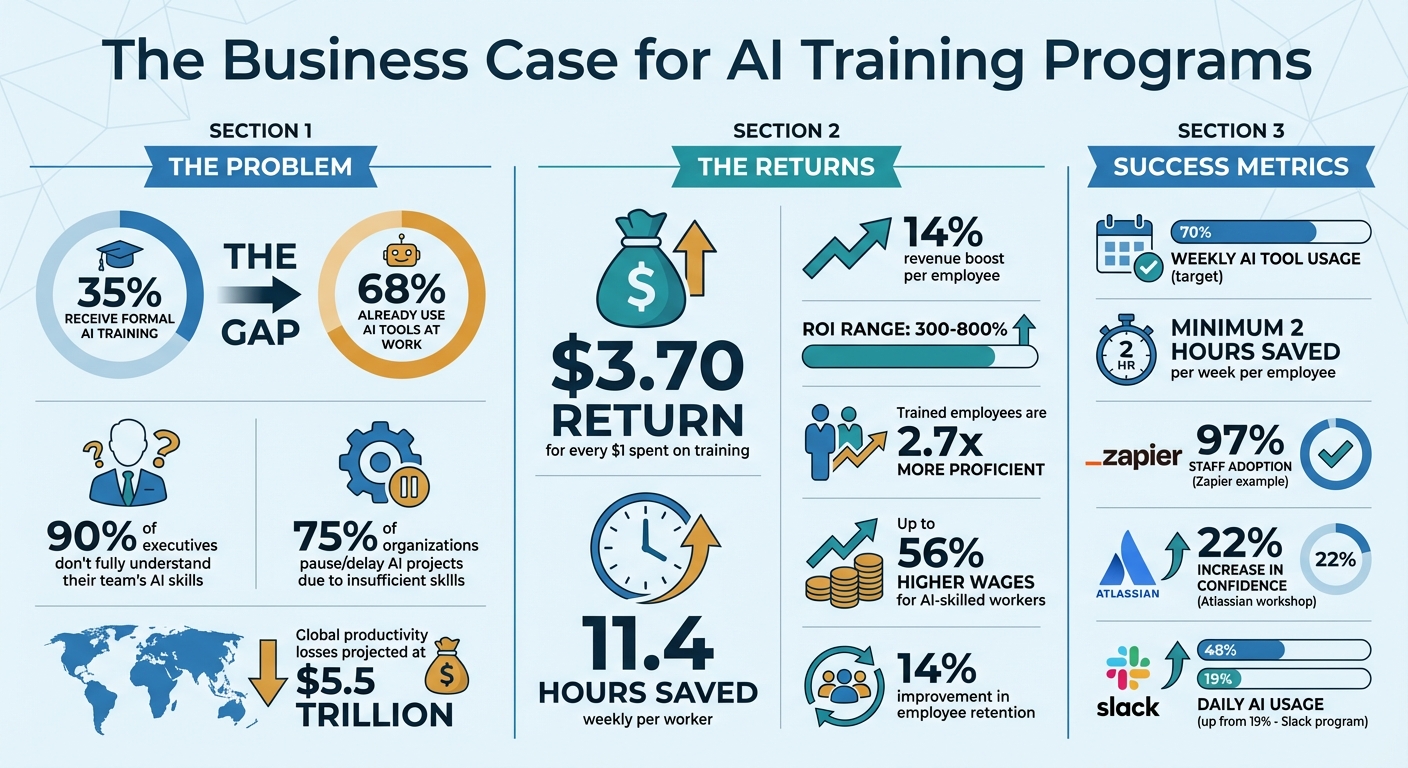
AI Training ROI and Impact Statistics for Teams
AI Skills Training for Leaders & Teams | Build the AI Mindset for Business
sbb-itb-a759a2a
Assessing Team Needs and Skill Levels
Before diving into training, it’s crucial to evaluate your team’s readiness. Here’s the challenge: 90% of executives don’t fully understand their team’s AI skills and proficiency, and 68% of employees tend to overestimate their abilities when self-rating. This gap often leads to setbacks, with 75% of organizations having to pause or delay AI projects due to insufficient internal skills.
Conducting a Skills Gap Analysis
A reliable way to assess AI proficiency is through a four-layer diagnostic approach. This includes:
- Self-assessment ratings where employees gauge their own skills.
- Performance tests that evaluate practical abilities, like crafting effective prompts or analyzing AI outputs.
- Managerial observations to identify strengths and weaknesses.
- Deliverable reviews to measure AI-related outcomes.
To simplify this process, use a proficiency rubric that rates employees on a scale of 0–3:
- 0: No experience.
- 1: Familiar (e.g., watched tutorials).
- 2: Practiced (e.g., applied AI tools in projects).
- 3: Proven (e.g., demonstrated measurable impact).
By applying this rubric, you eliminate guesswork and gain a clear understanding of who needs what level of training. For prioritizing skill gaps, calculate a priority score using this formula:
Priority = Frequency in Job Descriptions × (3 - Current Level).
Additionally, categorize the required skills into three groups:
- Core competencies: Task-related skills, like stakeholder management.
- Technical skills: How tasks are completed, such as prompt engineering.
- Tools: Platforms or software used, like ChatGPT or other AI tools.
This structured approach ensures training aligns with actual job demands, avoiding vague or irrelevant content.
Understanding Team Roles and Responsibilities
AI training should be tailored to specific roles because one-size-fits-all simply doesn’t work. For instance, a marketing team member creating blog content will need different AI skills than a finance analyst focused on forecasting models. Marketers rely on content creation and strategic decision-making, while analysts prioritize accuracy and analytical AI skills.
To streamline this, group employees into role clusters based on similar workflows and AI use cases. Examples include:
- Customer-facing teams (e.g., sales, support): Require conversational AI skills.
- Technical teams (e.g., IT, data): Need expertise in model integration and security protocols.
These clusters allow for highly relevant training modules that address real-world needs. A great example of this approach comes from June 2025, when McChrystal Group trained over 60,000 employees at a biopharma company. By focusing on workflow-specific training, the program significantly boosted AI adoption rates. As Victor Bilgen from McChrystal Group put it:
"AI adoption depends on whether it can help people with the tasks they're already doing daily".
Designing Role-Specific AI Training Programs
When creating AI training programs, it's crucial to align them with the specific needs of each role. A one-size-fits-all approach just doesn't cut it - after all, a finance analyst working on budget forecasts has very different needs compared to a marketer using AI writer tools to draft blog content. The goal is to design training paths that connect AI tools directly to the tasks employees tackle every day.
Building Customized Learning Modules
The first step? Match AI capabilities to specific job functions. For example, sales teams could learn how to use AI to analyze earnings calls and uncover potential client challenges, while HR managers might focus on tools for analyzing employee feedback. The focus here is answering a key question: "How does this help me do my job better?"
To make this work, structure the training into three tracks:
- Foundational: Basics that apply to everyone.
- Business-focused: Tailored for non-technical roles.
- Technical: Advanced modules for engineers.
Instead of creating everything from scratch, consider curating high-quality external resources. Deliver these as bite-sized microlearning modules (just 5–10 minutes each) through tools employees already use, like Slack or Teams.
"The blocker isn't willingness, it's know-how. Most employees aren't asking if they should use AI. They're asking how."
Finally, put these modules into action with real-world examples to ensure employees can apply their learning effectively.
Incorporating Practical Scenarios
Hands-on experience is crucial for mastering AI skills. Create simulation environments and capstone projects where employees can tackle real challenges - like personalizing customer service interactions or analyzing financial variances. These projects not only reinforce learning but also demonstrate how AI can drive tangible results.
Role-playing exercises are another great way to build soft skills. For instance, employees could practice using AI to handle customer complaints or negotiate deals. Pair these exercises with immediate feedback - quizzes and simulations that correct errors in real-time. Research shows that 72% of employees find AI-driven training more engaging than traditional methods, while personalized learning experiences can increase engagement by up to 60%.
To make learning even more accessible, build a searchable library of use cases organized by role and task. Employees can quickly find examples relevant to their work. Additionally, set up recurring "AI Office Hours" where teams can bring specific challenges to experts for guidance. This mix of structured training and on-demand support creates a practical, effective framework for adopting AI in the workplace.
Choosing the Right AI Training Tools and Platforms
Once you’ve outlined role-specific training modules, the next step is selecting a platform to deliver them effectively. The right platform can drastically reduce course creation time - cutting a 21-hour manual process down to just 4 hours.
Evaluating Learning Management Systems
When choosing a platform, start by aligning it with your team's goals. Are you aiming to reduce error rates? Speed up time to proficiency? The platform you select should directly support these objectives rather than simply offering flashy features.
Flexibility in content creation is key. Traditional LMS platforms only host content, requiring you to create everything manually. On the other hand, AI-powered systems like D2L Brightspace use artificial intelligence to structure content, generate quizzes, and adjust learning paths based on individual performance. This shift to AI-assisted workflows can cut administrative workloads by up to 40% in corporate settings.
Look for platforms with adaptive learning paths. These systems analyze user behavior - tracking module completion times, identifying areas of struggle, and noting skipped topics. They then adjust difficulty levels and recommendations, which can boost knowledge retention by up to 30%.
For compliance training, accuracy and oversight are critical. Since AI systems can sometimes introduce errors or bias, ensure the platform includes features like review gates, version history, and the ability to pull from approved company documents. Tools like Guru and Glean, for example, should only reference pre-approved standard operating procedures rather than generating content from scratch.
Integration is another must-have. Your platform should sync seamlessly with existing tools like HRIS, CRM, and communication systems to avoid data silos and make training materials easily accessible.
Ease of use is just as important. Complicated tools can discourage adoption by both administrators and employees. Running a 90-day pilot program with a small group can help you measure specific outcomes - such as a reduction in support tickets or an increase in conversion rates - before committing to a full rollout.
Here’s a quick look at how traditional and AI-powered LMS platforms compare:
| Feature | Traditional LMS | AI-Powered LMS |
|---|---|---|
| Course Creation | Manual (Hours/Days) | AI-Assisted (Minutes) |
| Quizzes | Manually Written | Auto-Generated |
| Learning Path | Fixed/Static | Adaptive/Personalized |
| Setup Time | Weeks to Months | Days |
| Primary Function | Hosting & Tracking | Creation, Hosting & Insights |
Popular platforms include 360Learning (starting at $8/user/month, 4.6/5 on G2), SC Training (free tier available; paid plans at $5/learner/month, 4.7/5 on G2), and Synthesia (starting at $18/month, 4.7/5 on G2 from 2,400+ reviews). Each has unique strengths: 360Learning is great for collaborative course building, SC Training is lightweight and easy to adopt, and Synthesia specializes in AI-generated video content.
For teams focused on content creation, there are additional tools that can simplify training documentation and development.
Introducing the AI Blog Generator Directory
In addition to LMS platforms, teams involved in creating training content - especially in marketing, communications, or learning and development - can benefit from specialized AI writing tools. The AI Blog Generator Directory (https://aibloggenerators.com) offers a curated list of AI writing tools designed for content creators.
This directory provides resources for tasks like optimizing SEO content structure, automated keyword research, CMS integration, and text editing. These tools can streamline the creation of training documents, internal knowledge bases, or employee-facing materials. It also includes features like presentation-building tools and multi-language support, which are particularly helpful for scaling training programs across global teams. While not a replacement for an LMS, the directory serves as a valuable resource to enhance your content creation process during training development.
Implementing and Measuring the Success of AI Training Programs
Rolling out training and assessing its impact are crucial steps in embedding AI into an organization. A structured approach ensures training translates into real-world application and measurable results.
Conducting Hands-On Training and Workshops
Workshops should focus on practical tools that employees can use immediately. For example, in 2026, Atlassian's Teamwork Lab hosted an "AI for the People Team" workshop for 250 employees using the Rovo platform. The session followed a "show, then do" format: facilitators demonstrated tasks, and participants practiced them with live support. The results? Confidence in drafting pages increased by 22%, confidence in using AI agents rose by 33%, and weekly tool usage jumped by 24%.
"When teams learn by doing, AI stops feeling abstract and starts driving real behavior change, from higher usage to stronger everyday skills." - Dr. Molly Sands, Head of the Teamwork Lab, Atlassian
To make workshops effective, structure them into 45-minute sessions: 10 minutes for explaining concepts, 25 minutes for hands-on practice, and 10 minutes for group reflection. Participants should leave with tangible assets like prompt libraries, workflow templates, or checklists they can use right away. For instance, Teamland's "AI First" workshop in 2026 helped a sales and marketing team optimize workflows using AI tools for content writing, with 58% of attendees feeling prepared to apply these optimizations immediately.
For reinforcement, consider microlearning. In 2024, Slack partnered with Almost Technical for a three-week program requiring just 10 minutes of daily learning. Employees shared their progress in a dedicated Slack channel, a method they called "practicing in public." This approach boosted daily AI usage from 19% to 48% and improved comfort levels from 43% to 72%.
A phased rollout is another smart strategy. Start with a pilot program in the first four weeks, targeting a receptive department like Marketing or Support. Expand to more teams in weeks 5-12, and then scale organization-wide in weeks 13-24. This phased approach allows for feedback collection, content adjustments, and the development of internal champions who can guide later participants. Tailoring the sessions to specific roles ensures employees can seamlessly transition from learning to applying their new skills.
Once employees have developed hands-on expertise, tracking their progress is key to ensuring these skills translate into meaningful business outcomes.
Monitoring Progress and Measuring ROI
Simply tracking completion rates isn’t enough to gauge the success of training. Instead, measure four key areas: Learning (knowledge gained), Adoption (actual use of tools), Impact (improvements in performance), and ROI (financial returns).
Start by establishing a baseline before training begins. Gather data on task completion times, error rates, and current AI tool usage. Then, monitor changes at 30, 60, and 90-day intervals. A successful program should lead to at least 70% weekly AI tool usage among trained employees, with each employee saving a minimum of two hours per week.
Use admin dashboards to monitor adoption. For instance, platforms like Zapier can track the number of AI workflows deployed and their frequency of use. When system data isn’t available, rely on surveys and managerial assessments - but discount self-reported time savings by 30–50% to account for overestimations.
To calculate ROI, use the formula: (Total Benefits - Total Costs) / Total Costs x 100%. Include all costs, such as content development, facilitator time, and the opportunity cost of employee participation. Monetize time savings by multiplying hours saved by the average hourly cost of employees. Well-implemented AI training programs often achieve ROIs between 300% and 800%. Companies with structured training have reported saving 11.4 hours per week per knowledge worker and seeing a 14% increase in revenue per employee.
| Evaluation Timing | What to Measure | How to Track It |
|---|---|---|
| Immediate (Day 0) | Satisfaction | Post-course surveys and NPS scores |
| Short-term (Week 2) | Knowledge | Quizzes and prompt-writing exercises |
| Mid-term (30-60 Days) | Behavior Change | Tool usage analytics and manager observations |
| Long-term (90+ Days) | Business Results | KPI comparison (before/after) and ROI calculation |
For high-stakes programs, consider using a control group. Train one team while leaving a similar group untrained for 90 days. This approach helps isolate the specific impact of training. Additionally, segment ROI calculations by department - for instance, Marketing may show different returns than Finance. This allows you to identify where AI delivers the most value and prioritize future investments accordingly.
Building a Culture of Continuous Learning
As AI tools evolve every few months, staying updated isn't optional - it’s essential. While initial role-specific training gets the ball rolling, a culture of continuous learning ensures employees keep their skills sharp and ready for what’s next. The key? Integrating learning into daily workflows, rather than treating it as a one-time event.
Creating Internal Learning Communities
One of the most effective ways to spread AI knowledge is through peer-to-peer sharing. Watching a colleague tackle an innovative project often sparks those “aha!” moments that drive real learning. For example, Zapier created a #fun-ai Slack channel where employees share their workflows, experiments, and even failures. They also host company-wide "AI Hackweeks", where teams collaborate to build practical solutions - like an events intelligence system. By October 2025, these initiatives resulted in 97% of Zapier’s staff incorporating AI into their daily work.
"The biggest learning happens when people see someone else's project or idea and have that 'I didn't even realize that was possible!' moment." - Helen Kupp, Founder, Almost Technical
To build this kind of culture, start by designating AI Ambassadors - early adopters who can mentor others. These ambassadors can lead monthly “show and tell” sessions where employees showcase their latest AI projects. Make AI a regular topic in sprint retrospectives and project planning meetings to normalize its use. Provide safe spaces for experimentation, such as hackathons or dedicated Slack channels, encouraging employees to try new ideas without fear of failure. Leadership can amplify this effort by sharing their own AI learning journeys, which boosts engagement across the board.
While internal communities are great for fostering peer learning, staying current with AI advancements is just as important.
Keeping Teams Updated on AI Trends
Given how fast AI evolves, it’s smarter to curate external resources rather than create custom training content that quickly becomes outdated. GitHub’s strategy is a great example: they run "How Do I AI?" weekly office hours. During these 60-minute sessions, employees bring real-world problems, and the format starts with top AI tools for writing and blogging demos followed by Q&A.
"The pace of AI innovation means that any custom training content you create will be outdated in months, if not weeks. A 'curate, don't create' philosophy is a more sustainable and effective approach." - Matt Nigh, Program Manager Director of AI for Everyone, GitHub
To keep learning accessible, set up a centralized hub with real-world use cases, prompt templates, and tool updates. Refresh this hub every quarter to reflect the latest advancements. Incorporate microlearning - quick, 5–15 minute daily tasks - to help employees build habits without feeling overwhelmed. Additionally, a searchable prompt library organized by role (e.g., Marketing, Legal, Sales) and task (e.g., Summarizing, Drafting) can make finding resources quick and easy.
The benefits of mastering AI basics are huge. Employees can triple their tool usage and save up to 11.4 hours per week. Plus, workplace training doesn’t just improve efficiency - it can boost employee retention by up to 14%. That’s a big deal, especially since AI-skilled workers often earn wages up to 56% higher than their non-AI counterparts.
Conclusion
Creating an effective AI training program isn't something you can check off a to-do list - it’s a continuous investment in developing your team's skills. The steps shared here, from identifying skills gaps to encouraging internal learning communities, provide a scalable framework for your organization. The most successful programs focus on structured, role-based learning and hands-on experience, steering clear of one-off workshops or passive video sessions.
The benefits are clear. Research shows that companies investing in formal AI training see an average return of $3.70 for every dollar spent. Knowledge workers also save an average of 11.4 hours per week on routine tasks. Trained employees are not only 2.7 times more proficient but can also earn up to 56% higher wages. Yet, these impressive stats highlight a glaring issue: only 35% of employees have received formal AI training, even though 68% are already using AI tools at work without proper guidance. This gap poses significant risks, including "shadow AI" security threats and productivity losses projected to reach $5.5 trillion globally.
"The difference between success and failure isn't buying licenses. It's building the human infrastructure that turns skeptical employees into power users." - GitHub
FAQs
How do I pick which AI skills to train first?
To begin, assess your team's existing skills and pinpoint where there are gaps. Start with building basic AI knowledge - this includes understanding what AI is, its uses, and when it’s appropriate to apply it. Establishing this foundation is key before moving on to more specialized skills like crafting effective prompts or evaluating AI models. Focus on areas that address pressing needs and empower your team to seamlessly incorporate AI into their everyday responsibilities.
What should role-specific AI training include?
AI training works best when it's customized to the specific needs of each role - whether that's marketing, sales, HR, finance, or operations. The key is to focus on practical, high-value use cases that align with what each team actually does day-to-day.
Keep the language simple and avoid drowning people in technical jargon. Instead, offer practical tools like prompt templates and guided exercises that make it easy to learn and apply AI tools effectively. For example, show marketers how to generate engaging ad copy or help HR teams streamline recruitment processes with AI.
Use real-world examples relevant to each role to make the training relatable. Track how well the training is being adopted and what kind of impact it's having - this helps ensure it’s hitting the mark. To keep the momentum going, implement strategies like shared prompt libraries, clear policies for AI use, and even set up dedicated office hours where team members can get help or ask questions.
How can we prove AI training ROI in 90 days?
To demonstrate the return on investment (ROI) of AI training within 90 days, focus on tracking adoption rates at 30, 60, and 90 days as early indicators of success. Pair this with measurable outcomes like time savings, increased productivity, revenue growth, and cost reductions to highlight tangible benefits.
Start by establishing pre-training benchmarks to compare progress. Break down ROI by specific roles or functions to provide a clear, detailed view of the training's impact. When presenting your findings, use metrics that resonate with executives: dollar amounts, ROI percentages, and payback periods. This approach ensures your results align with leadership's expectations and priorities.