Manually formatting citations is tedious and error-prone, often consuming over 52 hours annually for researchers. AI citation tools simplify this by extracting bibliographic details from sources like URLs, PDFs, or ISBNs and formatting them in seconds for styles like APA, MLA, and Chicago. These tools use machine learning to detect metadata such as author names and publication dates, achieving accuracy rates up to 98.2% for common formats.
Key Benefits of AI Citation Tools:
- Speed: Generate citations in seconds, even for bulk sources.
- Accuracy: Minimize errors, with a 25–40% error reduction compared to manual formatting.
- Integration: Seamlessly work with Word, Google Docs, and browser extensions.
Top AI tools like Scite and Scribbr provide advanced features like analyzing citations for context or integrating with university libraries. While AI handles most tasks, manual review ensures precision for non-standard sources. Whether you're a student or researcher, these tools save time and reduce stress while managing citations.
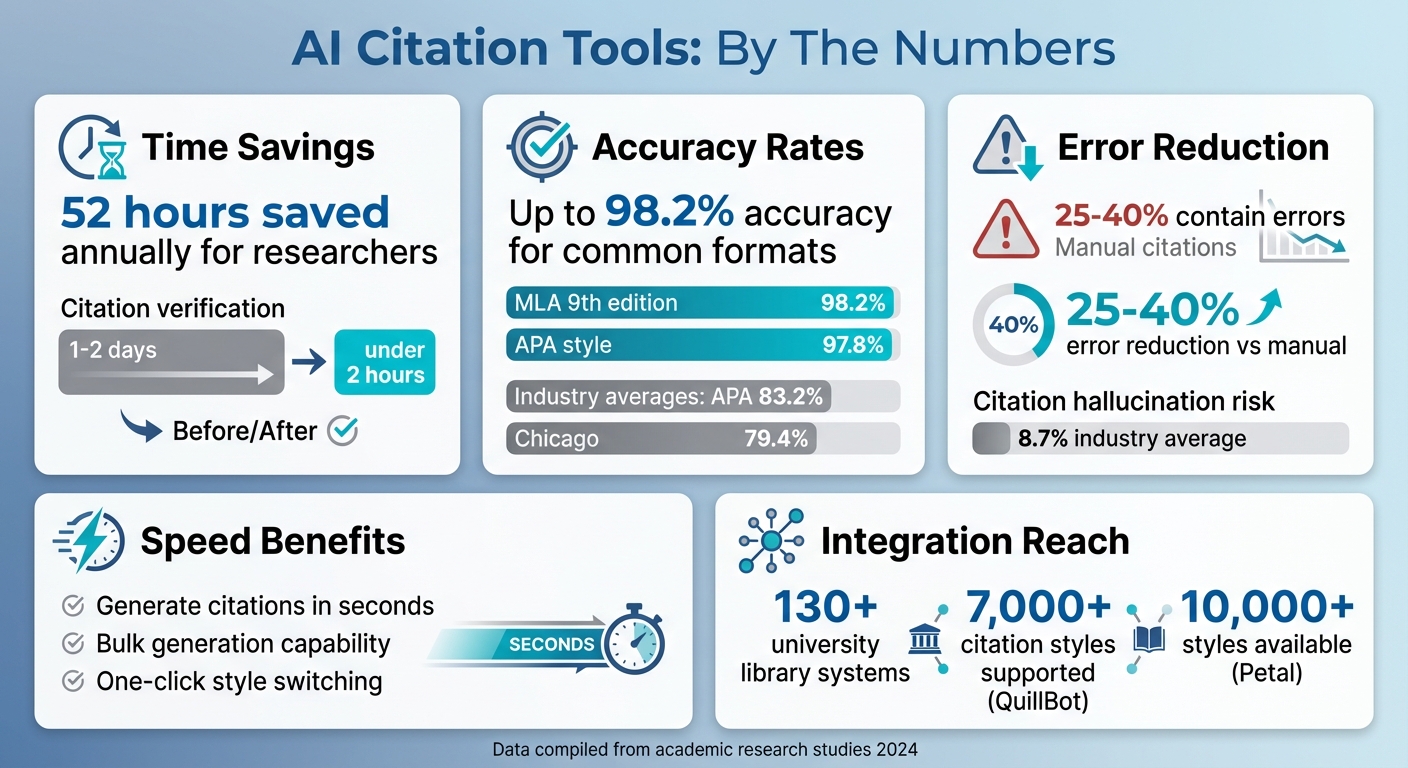
AI Citation Tools: Time Savings, Accuracy Rates, and Error Reduction Statistics
Discover the 4 Most ACCURATE AI Citation Tools for Auto Referencing
sbb-itb-a759a2a
Why Use AI for Citation Formatting
AI citation tools bring three standout advantages to reference management: speed, accuracy, and compatibility with your existing software. These tools streamline the entire process, making it faster and less prone to errors.
Faster Citation Generation
AI-powered citation tools can extract crucial details from DOIs, ISBNs, or URLs in just seconds. Forget about tedious manual entry - many platforms even allow bulk generation, letting you format dozens of sources at once.
The time savings are impressive. Tasks that might take 1–2 days, like verifying citations, can now be completed in under two hours with AI. Switching between citation styles, such as APA to Chicago, becomes a matter of a single click instead of hours of manual adjustments.
"AI speeds up every step from capturing a source to submitting a polished bibliography".
_ - Wessel Bos, author at RankMyAI_
By automating these processes, AI also reduces the risk of costly errors.
Fewer Formatting Mistakes
Manual citation work is prone to errors, with 25–40% of references typically containing mistakes. AI tools address this by automating details like punctuation, author name order, page ranges, and DOI formatting.
The top AI writing tools for citations boast accuracy rates of 98.2% for MLA and 97.8% for APA styles. That’s a significant improvement over the industry averages of 83.2% for APA and 79.4% for Chicago style.
"Finding tools that actually get this right can save academics countless hours of manual correction work".
_ - Dr. James Porter, Professor of Research Methodology at Stanford University_
With fewer mistakes to fix, you can focus more on your actual writing.
Works with Your Writing Software
AI citation tools are designed to fit seamlessly into your workflow. Many integrate directly with Microsoft Word and Google Docs via add-ins or plugins. This allows you to insert citations as you write, improving efficiency. These AI writer tools help maintain a consistent flow while managing complex bibliographies.
Browser extensions from tools like AI Blaze and AcademicScribe make it easy to pull metadata and format citations directly from web pages. Some tools even connect to over 130 university library systems, ensuring source authenticity as you work.
These features make AI citation tools a powerful ally for anyone managing references, whether for academic papers or professional projects.
How to Use AI Citation Tools
Getting started with AI citation tools is straightforward. Most tools follow a similar process, from picking the right tool to adding polished citations to your document.
Step 1: Choose Your Citation Tool
First, figure out what you need from a citation tool, much like choosing the best AI content generator tools for your business. If you’re after quick bibliography creation, tools like QuillBot or MyBib are great for simple formatting. For in-depth literature reviews, try AnswerThis or Elicit, which can pull data from hundreds of papers. Need real-time help while writing? Grammarly or Paperpal might be your best bet.
Check the citation styles the tool supports. Most tools handle APA, MLA, and Chicago, but some go further. For instance, Petal offers over 10,000 styles, and AnswerThis supports 2,681+ styles, including niche academic formats. Also, think about the types of sources you’ll be citing. If you’re working with podcasts or social media posts, make sure the tool can handle those.
Step 2: Enter Your Source Details
Once you’ve chosen your tool, it’s time to add your source information.
The quickest way is by using unique identifiers like DOI, ISBN, PubMed ID, or ArXiv ID. These allow the AI to automatically pull the metadata in seconds. Alternatively, you can paste a URL for a webpage or journal article, and the tool will extract details like the author, title, and publication date.
If you have a PDF, upload it to let the AI extract the necessary bibliographic details using natural language processing. Some tools even let you clean up messy citations - just paste your bibliography, and the tool will reformat it to match your preferred style.
If no identifiers are available, you’ll need to manually input the metadata. For journal articles, this includes details like authors, article title, journal name, year, volume, issue, and page numbers. For books, you’ll need the author, title, edition, publisher, location, and year.
Step 3: Select Your Citation Style
After entering your source details, choose your citation style. Most tools let you easily switch between formats like APA, MLA, Chicago, and Harvard. The AI will handle all the style-specific rules - punctuation, italics, capitalization, and author name order - automatically.
Some platforms even let you toggle between narrative citations (e.g., "Smith [2020] argues...") and parenthetical citations (e.g., "(Smith, 2020)") to better fit your writing style. Once you’ve picked a style, the tool is ready to generate accurate citations for your work.
Step 4: Create and Add Citations
With your style set, the tool generates both in-text citations and bibliography entries. Many tools integrate directly with Word or Google Docs through plugins, letting you insert citations without switching windows. For instance, Jenni AI allows you to type "@" followed by a keyword to instantly insert a citation.
You can also use drag-and-drop features or keyboard shortcuts for quick citation placement. Some tools even recognize when you paste a DOI or URL into your text and automatically convert it into a formatted citation.
Advanced platforms may keep a live reference list at the bottom of your document, updating it automatically as you add or remove in-text citations.
Step 5: Review and Export Your Citations
Before finalizing your document, double-check all AI-generated citations against the original sources. AI can sometimes misinterpret details like author names, publication years, or page numbers. Careful review is especially important for non-standard sources.
When you’re ready to export, most tools support formats like .docx, .rtf, and .txt, as well as research-specific options like BibTeX, RIS, and EndNote XML. If you’re managing multiple documents or collaborating, export your citations to a reference manager like Zotero for better organization.
For efficiency, process sources in small batches - around 10 to 20 at a time - to balance speed with accuracy.
AI Citation Tools Compared
AI citation tools come in all shapes and sizes: some prioritize speed and ease of use, while others focus on delivering unmatched accuracy. Understanding their features is key to finding the one that fits your needs.
Accuracy is the cornerstone of reliable citations, especially when your academic credibility is at stake. Scribbr stands out by using expert-verified citation formats, making it a go-to choice for thesis and dissertation work. On the other hand, Scite brings a unique feature to the table by analyzing over 1.3 billion citation statements from 187 million articles, showing whether a source supports or contradicts a claim. Dr. James Porter highlights the importance of precision in academic writing:
"Nothing undermines the credibility of academic writing faster than inconsistent or incorrect citations. Unfortunately, many AI writing tools generate non-existent sources or misapply formatting rules".
The risk of citation "hallucination", where tools create fake sources, averages around 8.7% across the industry. However, the best tools can achieve an impressive 98.2% accuracy for formats like MLA 9th edition. Beyond accuracy, pricing is another factor that sets these tools apart.
Pricing varies based on features and audience. Free tools like CitationGenerator.AI and MyBib are great for quick, no-frills formatting. QuillBot offers a solid free version with a premium plan at $9.95/month, catering to over 35 million users worldwide. For advanced capabilities, Scite charges $20/month, while SciSpace is priced at $30/month. Professional-grade tools like CiteAI Pro range from $19.99 to $34.99/month, and Yomu.ai offers plans between $12.99 and $24.99/month, emphasizing its high-accuracy verification system.
Here’s a quick breakdown of their features:
Feature Comparison Table
| Tool | Citation Styles | Key Strength | Monthly Price | Best For |
|---|---|---|---|---|
| QuillBot | 7,000+ | Simple interface, writing integration | $9.95 | Students needing quick formatting |
| Scribbr | Major styles | Expert-verified accuracy | Free core features | Thesis and dissertation writers |
| Scite | Major styles | Contextual analysis (Smart Citations) | $20 | Verifying research credibility |
| Yomu.ai | 43+ | High accuracy, 14-database verification | $12.99–$24.99 | Academic researchers |
| Anara | Major styles | Confidence levels, Zotero integration | $12–$18 | Collaborative projects |
| AnswerThis | 2,681+ | Line-by-line citations in lit reviews | $35 | Deep literature analysis |
Always double-check AI-generated citations against your original sources. Even the most reliable tools can misinterpret details like author names, publication dates, or DOI numbers. When using AI for citations, it’s crucial to specify the edition - such as "APA 7th edition" instead of just "APA" - to ensure compliance with current standards. Providing DOIs or ISBNs whenever possible further reduces formatting errors compared to relying on title-based searches.
Conclusion
AI citation tools have revolutionized how we manage bibliographies, turning what used to be a 52-hour yearly chore into a task completed in mere minutes. With support for thousands of citation styles, browser extensions, and word processor add-ins, these tools allow for real-time citation creation as you write.
Beyond speed, these tools significantly reduce errors. By cross-referencing reliable databases, AI minimizes common mistakes like missing author names or incorrect punctuation. Features like Scite's Smart Citations, which analyze over 1.3 billion citation statements, even help verify whether a source supports your argument.
"AI citation tools turn inaccurate references into properly formatted citations in minutes" - Wessel Bos, Writer, RankMyAI.
For trickier sources, verifying metadata and using DOIs can ensure accurate results. While AI automates most of the work, a quick manual review is still a good idea to confirm details like page numbers and edition information, especially for older or non-standard sources.
If you're looking to streamline your entire content creation process, the AI Blog Generator Directory offers a range of tools to complement citation generators. From SEO optimization and keyword research to CMS integration and multi-language support, these tools help simplify every step, freeing you up to focus on crafting meaningful content instead of getting bogged down by formatting.
FAQs
How can I verify if an AI-generated citation is accurate?
To ensure an AI-generated citation is accurate, take the time to cross-check it with reliable sources. You can use tools designed for citation verification or manually verify key details such as author names, publication dates, titles, and URLs by comparing them to the original sources. This step helps confirm that the citation is valid and genuinely supports your content. Since AI can occasionally produce errors, double-checking is essential before using any references in your work.
What sources do AI citation tools struggle with most?
AI citation tools often face challenges when dealing with intricate citation styles like APA, MLA, and Chicago. These styles come with detailed, specific rules that can trip up even advanced systems. Common issues include mistakes in formatting and errors in source metadata, such as incorrect author names, publication years, DOIs, or URLs. On top of that, some tools might even create entirely fake or fabricated sources. Because of this, manually checking citations is crucial to maintain accuracy and trustworthiness.
How can I stop AI tools from creating fake references?
AI can be a helpful tool, but when it comes to references, you can’t take shortcuts. Always verify citations before using them. Cross-check every reference with trusted sources or academic databases to confirm its validity.
There are tools, like citation verifiers, that can help flag invalid or fabricated references. But even with these, manual verification is key. Relying solely on AI for citation accuracy can lead to errors - and that can harm your credibility. Taking the extra time to double-check ensures your work stands up to scrutiny.