AI has drastically reduced the time and effort required for publishing content in CMS platforms by automating repetitive tasks like formatting, SEO optimization tools, and scheduling. What used to take up to 90 minutes per article can now be completed in just 2 minutes of review. Key benefits include:
- Time Savings: Teams save 60%-80% of operational time, enabling faster content deployment.
- Improved Efficiency: AI handles metadata creation, SEO optimization, and internal linking, ensuring consistent quality.
- Smarter Publishing: AI identifies the best times to publish based on audience engagement and automates notifications to search engines for faster indexing.
- Personalized Content: Tailors recommendations and formats for different platforms like WordPress, Webflow, or Shopify.
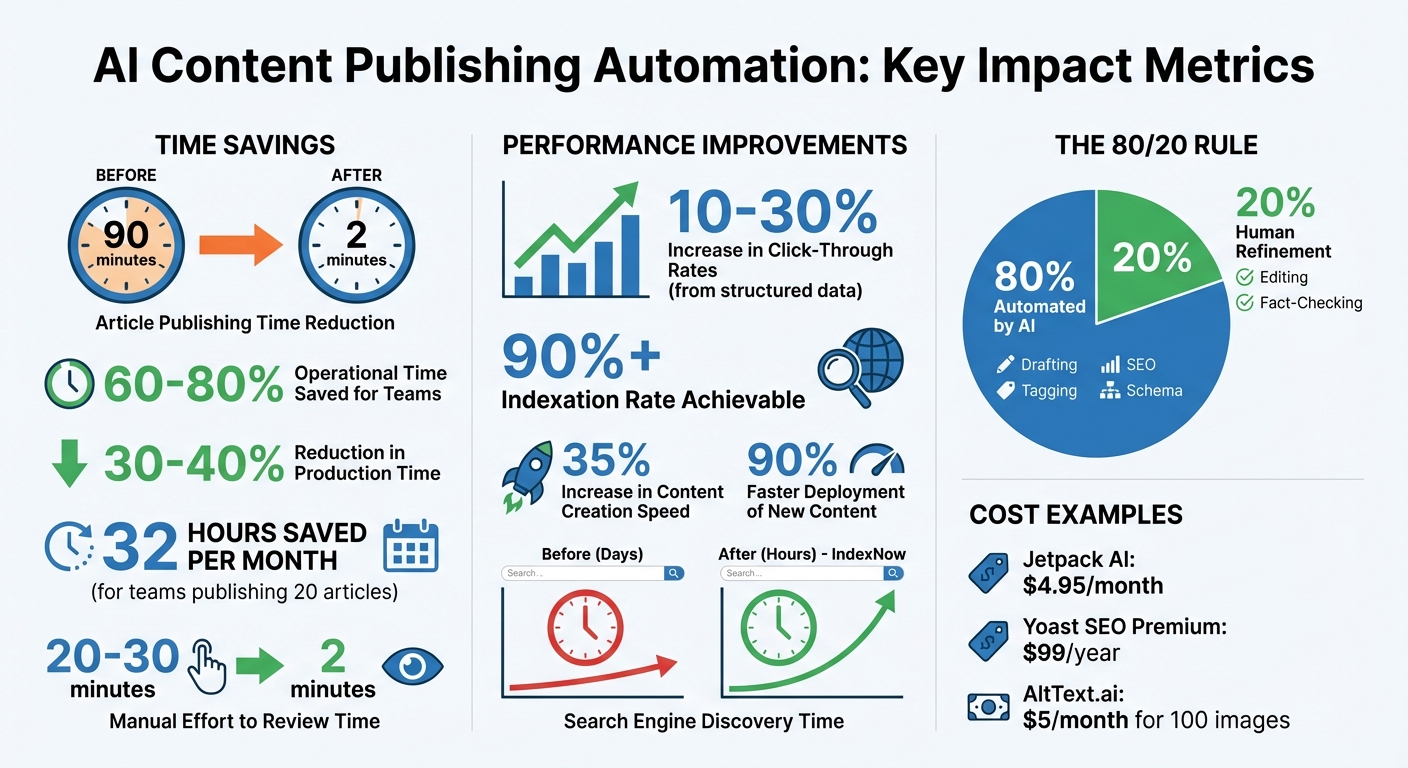
AI Content Publishing Automation: Time Savings and Efficiency Statistics
I Built My Own CMS in 21 Minutes So AI Agents Could Run My Blog
sbb-itb-a759a2a
AI Features That Automate CMS Publishing
AI tools are transforming content management by automating tasks like scheduling, SEO optimization, and personalized content delivery. These innovations save 30–40% of production time by reducing manual effort.
Automatic Scheduling and Publishing
AI takes the guesswork out of publishing schedules. It evaluates performance data, audience engagement trends, and time zone specifics to pinpoint the best times to publish. By identifying optimal windows based on audience activity, AI ensures your content reaches the right people at the right time. Advanced systems even prioritize foundational articles before diving into more complex topics.
To avoid issues like SEO cannibalization, AI flags scheduling conflicts, helping teams maintain efficiency. For example, a team publishing 20 articles a month could save around 32 hours of labor by automating this process. The most advanced platforms streamline workflows by connecting directly via API, eliminating the need for manual copy-pasting. These systems also trigger IndexNow notifications as soon as content goes live, cutting the time it takes for search engines to discover new content from days to just hours.
These capabilities set the stage for more advanced SEO automation.
SEO Optimization and Metadata Creation
AI doesn’t just schedule content - it fine-tunes every SEO detail to boost performance. It automatically generates meta titles (around 60 characters) and meta descriptions (155–160 characters) that are crafted to increase click-through rates. Structured data in JSON-LD format is also created for different content types like Articles, FAQs, and HowTo guides. Using Natural Language Processing (NLP), AI ensures drafts include key entities and subtopics, enhancing topical authority while keeping keyword density below 2% to avoid over-optimization.
AI also improves on-page elements, such as generating descriptive image alt text, refining header structures, and suggesting internal links that align with your site’s taxonomy. Before publishing, automated quality checks verify SEO essentials, ensure consistent formatting, and catch errors. Pages with strong structured data often see a 10% to 30% increase in click-through rates thanks to rich search results.
These SEO improvements integrate seamlessly with personalized content strategies.
Content Personalization and Recommendations
AI takes personalization to the next level by segmenting audiences based on their interests and behaviors. This ensures that each reader gets content tailored to their needs. By analyzing user behavior and jobs-to-be-done, AI recommends relevant articles, boosting topical authority and improving user experience. This also makes your content easier for search engines and AI models like ChatGPT or Gemini to understand and reference - a practice known as Generative Engine Optimization (GEO).
For internal linking, AI follows structured rules, such as linking to a pillar page and including lateral links within a content cluster. This prevents orphan pages and ensures link equity is distributed effectively. For organizations managing multiple platforms, AI can adapt a single piece of content into versions tailored for WordPress, Webflow, or Shopify, all in one go. Tools listed on the AI Blog Generator Directory (https://aibloggenerators.com) combine these features, offering CMS integration, SEO tools, and automation workflows in one package.
How to Set Up AI Automation in Your CMS
AI can streamline content publishing, and integrating it into your CMS doesn’t have to be a daunting task. You can break the process into three key steps: selecting the right CMS, securely connecting APIs, and testing your setup in a controlled environment.
Choosing a CMS That Supports AI
Start by selecting a CMS that offers robust API capabilities. For example, WordPress has had a built-in REST API since version 4.7, making it a popular choice for automation. Alternatively, headless platforms like Contentful and Sanity are designed for API-driven workflows, while traditional systems like WordPress might require additional API configurations or plugins.
Make sure your chosen CMS supports granular API credential management. This allows you to restrict access to specific tasks, such as content creation and editing, and revoke credentials for individual tools without disrupting your entire setup. Look for platforms that also support webhooks, as these can trigger automated actions based on specific events, giving you even more customization options.
Once you’ve selected your CMS, the next step is to securely connect your AI tools.
Connecting AI Tools to Your CMS
Begin by generating secure API credentials, such as WordPress application passwords or Webflow API tokens. Then, create a "translation dictionary" to map AI output fields to the corresponding CMS input fields - like matching "headline" to "post_title". This ensures that content is automatically placed in the correct sections of your CMS. Additionally, configure metadata rules for tasks like generating alt-text or assigning categories based on your translation dictionary.
To define automation logic, middleware tools like Zapier, Make, or n8n can be incredibly helpful. For instance, you can set up triggers, such as moving a document to an "Approved" folder, to initiate an upload. Many AI tools listed on the AI Blog Generator Directory (https://aibloggenerators.com) come with built-in connectors, simplifying the integration process and reducing the need for multiple third-party services.
With the connection established, it’s time to test and fine-tune your automation in a safe environment.
Testing and Adjusting Your Automation
Always test your setup on a staging site or publish content in "Draft" mode initially. This allows you to verify that formatting, metadata, and other elements are applied correctly before anything goes live. Check the live HTML to confirm that key elements like H2/H3 tags, bold text, and internal links are rendered properly and aren’t stripped by the API.
Set up automated notifications through Slack or email to alert your team if there are issues, such as a failed API connection or a post stuck in the publication queue. For high-volume publishing, consider processing articles in batches during off-peak hours to avoid exceeding CMS API rate limits. You can also configure your workflow to send an IndexNow API request immediately after a post is published, ensuring search engines are promptly notified.
Keep an eye on your system’s performance. A well-optimized setup should achieve an indexation rate of 90% or higher. Monitor for any "ranking drift" that could affect visibility, and regularly audit your workflow. Check for publishing errors weekly, review API tokens monthly, and update your field mappings every quarter to maintain efficiency.
CMS Platforms with Built-In AI Automation
Many CMS platforms now include native AI tools that simplify publishing tasks, reducing the need for multiple third-party tools. These built-in features align with earlier discussions on AI integration, helping streamline and automate the publishing process.
WordPress with AI Plugins
While WordPress doesn’t have AI in its core, plugins like Jetpack AI Assistant bring automation directly into the Gutenberg editor. This tool can generate blog posts, create structured lists and tables, and optimize content with features like one-click title and featured image generation. It also supports tone adjustments and translations in 12 languages.
Jetpack offers a free tier with 20 requests, while paid plans start at $4.95 per month for the first year when billed annually. Other AI-driven plugins include Yoast SEO Premium ($99 annually), which creates meta descriptions and social snippets, and AltText.ai (starting at $5 per month for 100 images), which generates descriptive alt text to improve accessibility and SEO. For publishers with moderate workloads, these tools save considerable time and effort.
Contentful and API-Based Automation
Contentful integrates AI through its "AI & Automations" feature, enabling tasks like rewriting and translating content via preferred language models. Using triggers - such as "Entry Published" or "Workflow Step Changed" - the platform can automatically generate SEO metadata or localize web pages.
In March 2025, Biogen, a healthcare company, used Contentful’s AI Actions to localize web pages in multiple languages. Arthur Allard, Customer Solutions Manager at Biogen, shared:
"We are now able to localize, clone, and translate a web page from one language to another in a matter of minutes vs. days previously"
. While this integrating AI content generation APIs into CMS allows for extensive customization, it may require developer support during initial setup.
Sanity and Custom Publishing Workflows
Sanity’s Content Agent is tailored for large-scale content operations. The agent is schema-aware, meaning it understands document structures, field requirements, and validation rules.
Sanity excels in bulk operations, allowing users to audit or update hundreds of documents simultaneously using natural language commands. It can transform raw documents, like press releases, into fully structured articles with metadata, images, and alt text. Its "Staged Changes" feature groups AI-generated edits into releases for team review before publishing, providing greater control over content. These capabilities further reduce manual tasks, making publishing more efficient.
Conclusion
AI automation is reshaping how content moves from draft to publication, turning what used to be time-consuming tasks into quick, efficient processes. Tasks that once required 20–30 minutes of manual effort can now be completed with a simple 2-minute review, removing the bottlenecks that often slow down publishing teams. This shift allows content creators to devote more energy to strategy and creativity instead of repetitive, routine tasks.
A great way to understand this efficiency is through the 80/20 rule. AI takes care of around 80% of the heavy lifting—using essential AI content writing tools for drafting, tagging, SEO optimization, and schema creation - while human editors step in for the final 20% to refine and fact-check the content. As Brightspot explains:
"AI can get you 80% of the way there, but human intervention is required to refine and perfect the final 20%"
This balance ensures high-quality output while significantly cutting down production time.
The benefits go beyond speed. AI-powered tools also boost search visibility. For example, integrating protocols like IndexNow - discussed earlier - means new content can be discovered by search engines within hours, not weeks. Additionally, modern workflows now emphasize Generative Engine Optimization (GEO), making content accessible not only to search engines but also to AI models like ChatGPT and Perplexity.
For teams publishing 20 articles a month, automation can save 32 hours - time that can be reinvested in more strategic and creative initiatives. Companies using AI-driven CMS platforms have reported a 35% increase in content creation speed and up to 90% faster deployment of new content.
If you're looking to simplify your publishing process, check out the AI Blog Generator Directory. This resource offers a range of AI tools with features like CMS integration, automated keyword research, and SEO optimization. By adopting these tools, your team can focus on what truly matters: innovation and creativity.
FAQs
What CMS tasks can AI automate end-to-end?
AI takes the reins on essential CMS tasks, simplifying the content publishing process. It can manage everything from content creation and formatting to SEO metadata suggestions and even embedding schema markup. Beyond that, AI handles internal linking, scheduling, publishing, and indexing, cutting down on manual work and minimizing errors.
With integrations for platforms like WordPress, AI ensures smooth workflows for content generation, editing, and publishing. This frees up teams to concentrate on strategy and creativity, rather than getting bogged down by repetitive tasks.
How do I connect AI to my CMS safely with APIs?
To connect AI to your CMS securely using APIs, here’s what you need to do:
- Choose a well-documented API like REST or GraphQL provided by your CMS to handle content effectively.
- Use secure authentication methods, such as OAuth or API tokens, to protect access.
- Always test your integration on a staging site before deploying it to your live environment.
- Conduct regular security audits and store API credentials in a safe and protected location.
These steps help maintain a secure and dependable connection between your AI and CMS.
Will AI automation hurt SEO or rankings?
AI-powered automation in content publishing isn't a guaranteed threat to SEO or rankings. In fact, when done right, it can actually enhance them. These tools can simplify workflows, fine-tune SEO components like meta descriptions and keyword usage, and maintain a steady publishing schedule.
That said, automation can backfire if not handled carefully. For instance, producing low-quality or duplicate content can negatively impact rankings. The real trick lies in using automation wisely - to create well-optimized, high-quality content while sticking to SEO best practices.