AI has transformed NFT creation, enabling anyone - from beginners to professionals - to design visually consistent and tailored digital art. By leveraging technologies like GANs, Neural Style Transfer, and Diffusion models, creators can generate unique art styles with ease. These tools handle technical tasks such as color adjustments and lighting, allowing artists to focus on refining their vision.
Key takeaways:
- Advanced AI tools like GANs and Diffusion models generate realistic and detailed NFT art.
- Neural Style Transfer blends content and style for custom visuals.
- Writing precise prompts (e.g., subject, color, mood, and composition) is crucial for high-quality results.
- Fine-tuning AI settings (e.g., resolution, style, and chaos levels) enhances output quality.
- Platforms like Ethereum, Polygon, and Tezos support minting AI-generated art into NFTs.
AI simplifies the process, from creating custom styles to minting NFTs, making digital art more accessible than ever before.
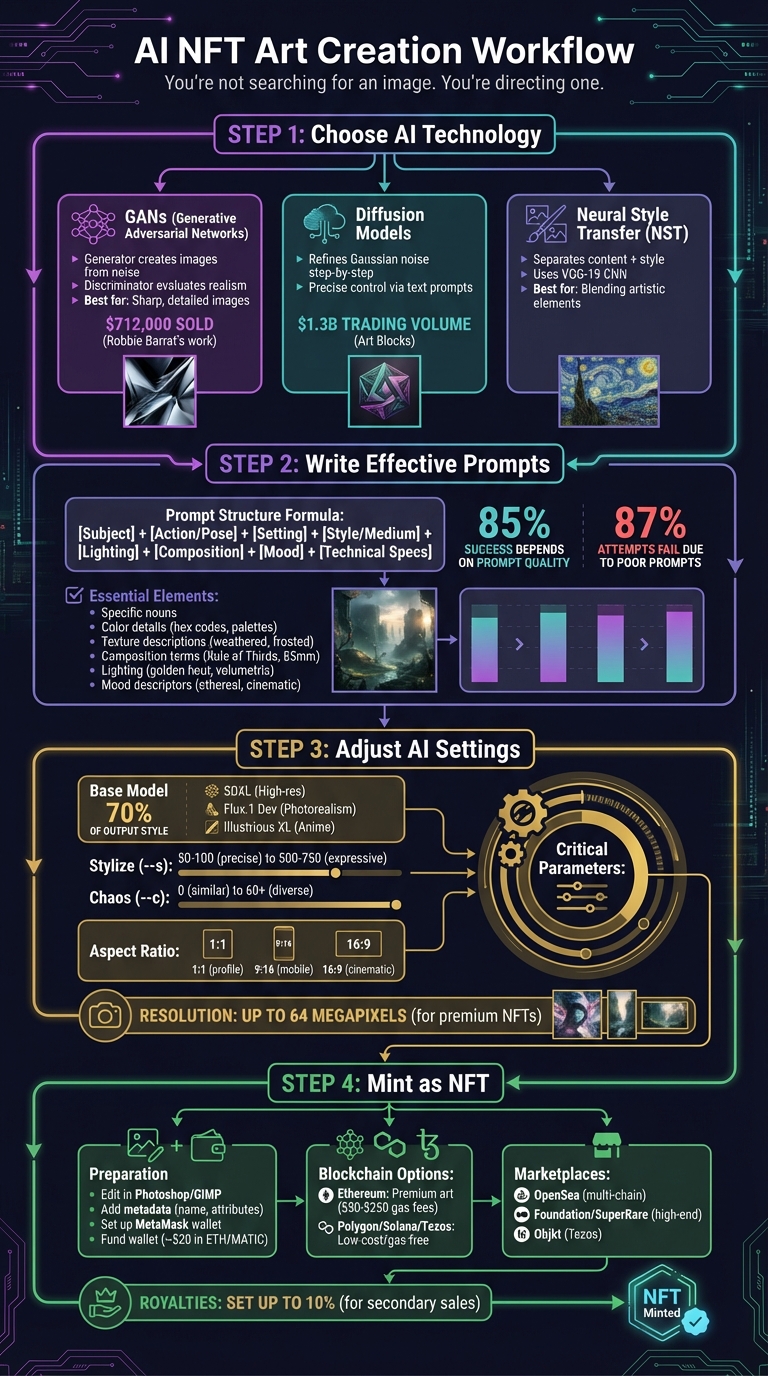
AI NFT Art Creation Workflow: From Prompt to Minting
How to Create an NFT Art Collection Using AI for FREE
sbb-itb-a759a2a
How AI Creates Custom NFT Art Styles
AI tailors NFT artwork using advanced machine learning methods. Two key techniques - Generative Adversarial Networks (GANs) and Neural Style Transfer (NST) - enable the creation of visually distinct and cohesive art collections.
Both approaches rely on latent space, a mathematical framework where visual features are encoded as vectors. By exploring different points in this space, AI models can generate endless variations in elements like color, texture, and mood, all while keeping a consistent artistic style. Here's a closer look at how these technologies work.
Generative Models Explained
GANs are a cornerstone of AI-generated art. They function through a "minimax game" involving two components: the Generator, which crafts images from random noise, and the Discriminator, which evaluates their realism. This dynamic pushes the generator to improve continuously. As Aditya Sharma from LearnOpenCV explains, "The generator tries to learn the data distribution, by taking random noise as input, and producing realistic-looking images".
"Generative Adversarial Networks is the most interesting idea in the last ten years in machine learning." - Dr. Yann Lecun, Chief AI Scientist, Meta
Another approach, Diffusion models, begins with Gaussian noise and refines it step-by-step to create detailed images. These models allow precise control through text prompts or reference images, making them especially useful for generative art platforms like Art Blocks. Art Blocks has achieved over $1.3 billion in trading volume, showcasing the market's appetite for AI-driven art. For instance, Fidenza #313, a piece by Tyler Hobbs created using a custom flow field algorithm, sold for 1,000 ETH (around $3.3 million) in August 2021.
GANs are particularly prized for their ability to produce sharp, detailed images. Unlike models that rely on Mean Squared Error (MSE) loss functions, GANs avoid the blurriness often associated with such methods. While GANs excel in realism, Neural Style Transfer offers a different way to blend artistic elements with content.
How Style Transfer Works
Neural Style Transfer (NST) separates an image into two components: content (the structure and layout) and style (the colors and textures). This technique employs pre-trained Convolutional Neural Networks (CNNs), such as VGG-19, to extract features. Higher layers of the CNN (like conv4_2) capture the image's structure while ignoring fine details.
The style aspect is captured using Gram matrices, which analyze the relationships between filter responses in a neural network layer. This method identifies textures and patterns without focusing on their exact placement. NST minimizes a Total Loss, combining Content Loss and Style Loss in a weighted sum.
For NFT artists, tweaking the ratio of content weight to style weight can dramatically alter the final piece. A lower content-to-style ratio - for example, a content weight of 1 and a style weight of 100 - results in more abstract and stylized images. Modern systems now enable arbitrary style transfer, which applies any style to any image instantly, without needing to retrain the model for each new style.
In March 2022, Robbie Barrat’s "AI-Generated Nude Portrait #7 Frame #64", created using GANs, sold at Sotheby’s for approximately £630,000 ($712,000). For video-based NFTs, developers incorporate temporal coherence loss during training to maintain consistent style across frames, avoiding issues like flickering. Mastering these techniques allows creators to craft compelling prompts and fully harness AI's artistic potential for NFT projects.
Writing Effective Prompts for AI Art Generation
While top AI tools for writing and blogging excel at text, the real magic in art generation lies in how you craft your prompts. For standout NFT art, the way you write your prompt makes all the difference. Studies reveal that prompt quality determines 85% of an AI-generated image's success, yet 87% of attempts fail because creators often use search-style queries instead of clear, direct instructions.
"You're not searching for an image. You're directing one." – BuildFastWithAI
A solid prompt follows a clear structure: [Subject] + [Action/Pose] + [Setting/Environment] + [Style/Medium] + [Lighting] + [Composition/Camera] + [Mood] + [Technical Specs]. For example, instead of simply asking for "a dog", try something like: "a golden retriever sitting on weathered oak stairs, golden hour lighting, close-up shot, warm and nostalgic mood, 8K resolution."
Specifying Visual Elements
Start with specific nouns rather than abstract concepts. For instance, instead of "love", describe "two hands intertwined, wearing silver rings." Adding details like age, clothing, or facial expressions gives the AI a clearer picture and reduces randomness.
When it comes to color, go beyond basic terms. Use phrases like "teal and orange", "warm earth tones", or "pastel mint and peach" to create a consistent look. For even greater precision, include hex codes like "#2D5016."
Texture and material descriptions are essential for depth and realism. Instead of generic surfaces, specify tactile qualities like "weathered oak", "frosted glass", "liquid gold", or "moss-covered stone." These details help the AI generate rich, textured visuals.
For composition, leverage cinematography techniques to guide the virtual camera. Terms like "Rule of Thirds", "Leading Lines", or "Symmetrical Composition" can prevent default, center-framed layouts. Including shot types such as "close-up", "wide shot", or "bird's eye view" ensures intentional framing. For photorealism, you can even specify lenses, such as "85mm f/1.4" for portraits or "wide-angle lens" for landscapes.
Describing Artistic Styles and Moods
Style plays a major role in defining your NFT's visual identity. Whether it's a digital illustration, oil painting, or 3D render, explicitly stating the medium - like "watercolor", "charcoal", or "vector art" - shapes both texture and rendering quality.
Lighting dramatically influences the mood of your piece. Swap generic terms for specific ones like "golden hour", "blue hour", or "chiaroscuro." Professional photography terms like "volumetric lighting" can guide the AI in handling shadows and color more effectively.
For setting an emotional tone, use mood descriptors such as ethereal, ominous, whimsical, melancholic, or cinematic. Pairing mood with lighting - like "haunting blue hour mist" or "serene golden hour glow" - creates a more vivid atmosphere.
You can also reference artists or styles to shortcut complex visual ideas. For example, "in the style of Salvador Dalí" or "inspired by Ukiyo-e" can help the AI replicate intricate details. Experiment with style blending, such as "Pixar style with a cyberpunk twist", to create unique hybrid aesthetics that stand out in NFT marketplaces.
Lastly, front-load the most important keywords in your prompt. Many AI models prioritize the first terms, so place your primary subject and style up front before adding additional details.
Prompt Examples for Different Art Genres
Here are some examples of how detailed prompts can elevate different art styles:
Cyberpunk portrait:
"Close-up portrait of a woman with neon pink hair, cybernetic eye implants, rain-soaked Tokyo street background, cinematic lighting with purple and teal neon glow, Blade Runner aesthetic, shot on 85mm f/1.4, moody and atmospheric, 8K, --ar 9:16"
Impressionist landscape:
"Wide shot of a lavender field at sunset, soft brushstrokes, warm earth tones with golden hour lighting, in the style of Claude Monet, oil painting texture, dreamy and serene mood, pastel color palette, --ar 16:9"
Abstract geometric NFT:
"Symmetrical composition of interlocking hexagons, iridescent surfaces with liquid gold accents, vaporwave aesthetic (magenta and teal), volumetric lighting, 3D octane render, sharp, minimalist, --ar 1:1"
Dark fantasy character:
"Full-body shot of a hooded figure holding a glowing staff, moss-covered stone ruins background, chiaroscuro lighting with dramatic shadows, Baroque painting style, ominous and mysterious mood, matte textures, --ar 2:3"
To refine your output further, use negative prompts to exclude unwanted elements:
--no text, watermark, blurry, extra fingers, deformed hands
This ensures clean, professional-quality artwork ready for minting. Always specify aspect ratios - like 1:1 for profile NFTs, 9:16 for mobile art, or 16:9 for cinematic scenes - as these significantly affect composition.
Think of your first prompt as a starting point. Generate a baseline image, then tweak one variable at a time - like adjusting lighting or composition - to see how it impacts the final result. This step-by-step approach helps you zero in on the exact look you want.
Once your prompts are fine-tuned, the next step is optimizing AI settings for even better results.
Adjusting AI Settings for Better Results
If you're aiming to create standout NFT art, crafting precise prompts is just the beginning. Fine-tuning AI settings is what truly allows your artistic vision to shine. These parameters play a major role in shaping the final look of your NFT artwork.
The base model you choose is particularly important - accounting for about 70% of your output style. For example, SDXL is a reliable choice for high-resolution art (1024x1024 pixels) and supports LoRA-based customization. If photorealism or accurate text rendering within images is your goal, Flux.1 Dev excels in those areas. For anime or illustrative styles, Illustrious XL or Animagine XL 4.0 are better suited.
"The prompt is only 50% of the work. The rest is hidden in the parameters. If you are still rolling the dice and hoping for a good result, you are just a hobbyist." – AI Creative Hub
Configuring Generation Parameters
Several key settings influence the quality and style of your output. Canvas size and aspect ratio are critical for composition and detail. Use --ar 1:1 for profile images, --ar 9:16 for social media stories, and --ar 16:9 for cinematic scenes to avoid unnecessary cropping later. Platforms like NightCafe even allow 64-megapixel downloads, ideal for premium NFT marketplaces. However, default generations often cap at 2.2 megapixels, so increasing resolution is essential for professional-grade results.
The stylize parameter (--stylize or --s) lets you control how much artistic freedom the AI takes. A lower setting (50–100) is ideal for precise work like logos or product art. For more expressive creations, such as fine art, bump it up to 500–750.
Chaos (--chaos or --c) introduces variation into your image set. A low value (0) results in similar compositions, while higher values (60+) generate diverse angles, colors, and layouts - perfect for brainstorming new ideas. For experimental or avant-garde collections, the weird parameter (--weird or --w) can push the AI toward unconventional aesthetics, with a range from 0 to 3,000.
For photorealistic or cinematic output, try using --style raw in Midjourney v5.1, v5.2, or v6. This removes the AI's default stylistic bias, aligning the results more closely with your prompt. Additionally, the CFG scale can tweak the overall style: lower values (3–6) create softer, more organic looks, while higher values (7–10) are better for precise, clean styles like vector art.
Improving Results Through Testing
Getting the best results often requires systematic testing. Tools like X/Y Plot allow you to test a single prompt across different base models and LoRA weights (ranging from 0.4 to 1.0), making it easier to find the perfect balance for your NFT collection. If your images lack sharpness, upscaling them to 4K can significantly improve clarity.
When combining multiple LoRAs (style plugins), keep individual weights between 0.5 and 0.8. Exceeding a combined total of 1.0 can lead to image degradation. Start with a baseline image and adjust one parameter at a time - whether it's resolution, stylization, or chaos - to understand how each change affects the final result.
For anime-focused artwork, the Niji model offers presets like --style scenic for detailed backgrounds or --style cute for charming subjects. If you're using ComfyUI, IPAdapter nodes can extract style from a reference image and apply it to new creations, ensuring consistency throughout your NFT collection.
Minting Your AI Art as NFTs
Once your AI-generated artwork is ready, the next step is turning it into a blockchain-based NFT. This process certifies the ownership and authenticity of your creation. To get started, you’ll need to properly prepare your files and select the right blockchain platform. Here’s how to make sure your art is mint-ready and reaches the right audience.
Preparing Files for Minting
First, refine your AI artwork using editing tools like Photoshop or GIMP. This step helps your piece stand out by adding unique details that set it apart from raw AI outputs. Once edited, prepare your metadata fields - these include the asset name, a descriptive summary, and specific attributes such as "Style: Surreal" or "Year: 2026" - to make your NFT more discoverable on marketplaces.
Before uploading, ensure you have the legal rights to sell your AI-generated art as an NFT. Check the terms of service for your AI tool (e.g., DALL-E, Midjourney) to confirm ownership rights. Set up a MetaMask wallet and securely store your recovery phrase offline. Fund your wallet with a small amount of cryptocurrency, such as $20 worth of ETH or MATIC, to cover transaction fees.
You might also want to prepare high-resolution versions of your artwork as "unlockable content" for NFT buyers. Additionally, you can include an external link in your metadata that points to your portfolio or a 4K version of the file. To ensure lasting authenticity, consider freezing your metadata on decentralized storage - though this step will incur a gas fee.
Choosing a Blockchain Platform
The blockchain you choose will affect both minting costs and your audience reach. This step connects your AI-generated art to a secure, tradable digital identity. Ethereum is the go-to network for premium digital art, but transaction fees can vary widely, ranging from $50 to $250, depending on network activity. For more budget-friendly options, platforms like Polygon, Solana, and Tezos offer low-cost or even gas-free minting.
Select a blockchain that aligns with your target marketplace. For example, OpenSea is the largest general platform and supports multiple chains, while Foundation and SuperRare cater to high-end digital art. If you’re minting on Tezos, Objkt is the main marketplace, while Solana users will need a Phantom wallet instead of MetaMask. Most platforms also let you set secondary sale royalties up to 10%, allowing you to earn passive income whenever your NFT is resold. Start by minting a single piece before expanding into a full collection.
Conclusion
AI has turned the once complex and technical process of creating NFTs into an approachable and creative experience. Tools like Higgsfield's Moodboards and Midjourney's Model Personalization now allow artists to shape their visual style with reference images instead of relying on complicated text prompts. What used to require over 20 high-resolution images and expensive GPU setups can now be done with just one image on a standard computer.
This shift isn't just about making things easier - it also brings speed and consistency to the table. AI can produce hundreds of variations while keeping the same color scheme, mood, and artistic feel throughout an entire collection. Platforms like Recraft offer intuitive dashboards packed with features like background removers and upscalers, making it possible to create professional-quality digital art without needing advanced skills. You can even fine-tune your designs by applying specific HEX codes to ensure your NFTs align perfectly with your brand.
"Creating art with AI is like having a creative partner who never sleeps." – Recraft
To get started, gather 10–30 cohesive reference images. Adjust style weights - for instance, dialing a LoRA setting to 0.7 instead of 1.0 - to control how strongly your custom aesthetic comes through. After generating your base designs, bring them into Photoshop for manual tweaks to add that personal, human touch that makes your work stand out. These steps let you make the most of AI's capabilities while maintaining your unique artistic vision.
The best part? The entry barrier is incredibly low. Whether you're crafting a single piece or a massive 10,000-item collection, AI equips you with AI content generator tools to create a distinct visual identity - no traditional art skills required. While the technology handles the technical side, you can focus on steering the creative direction and building something that’s entirely your own.
FAQs
How can I keep a consistent style across a whole NFT collection?
To keep an NFT collection visually consistent, it's crucial to establish clear visual guidelines. Start by defining a color palette, consistent lighting styles, and specific character features that align with the collection's theme. Tools like reference images or moodboards can serve as visual anchors during the creative process.
For technical consistency, consider locking seeds during the generation process. This ensures uniformity across the collection. Techniques such as LoRA (Low-Rank Adaptation) can also be used to fine-tune the output, maintaining a cohesive style. Additionally, creating and saving custom style presets can streamline the process, ensuring every piece fits seamlessly into the collection's overall aesthetic. This approach helps make the collection easily recognizable and visually unified.
Which AI settings matter most for higher-quality NFT images?
Creating standout NFT images involves tweaking specific AI settings to achieve the best results. One of the most important aspects is fine-tuning style parameters, which allows you to shape the overall aesthetic. Whether you're aiming for a cinematic vibe or a more realistic approach, these parameters let you control the artistic direction.
Another critical factor is adjusting training parameters, such as learning rates and epochs. These settings play a big role in ensuring your artwork is consistent and polished. Additionally, using personalization tools can help craft unique and refined styles, giving your NFT creations a distinctive edge.
By combining these techniques, you can produce NFT artwork that stands out visually and leaves a lasting impression.
What rights do I need before minting AI-generated art as an NFT?
Before turning AI-generated art into an NFT, make sure you have the necessary rights to the content. This could mean owning the work outright or securing the appropriate licenses. Copyright laws and questions of originality in AI-generated creations are tricky and constantly changing, so it’s essential to verify your rights before moving forward.