Post-editing AI translations can save time and money while improving content quality. By refining machine-generated translations, you can ensure clarity, accuracy, and tone alignment without starting from scratch. Here's what you need to know:
- Light Post-Editing (LPE): Focuses on correcting major errors for clear and accurate content. Editors can process 800–1,500 words/hour and aim for 85–95% human quality.
- Full Post-Editing (FPE): Delivers publication-ready quality by refining tone, style, and accuracy. Editors handle 500–800 words/hour, ensuring fewer than one major error per 1,000 words.
- Pre-Editing: Simplify and standardize your source text to reduce translation errors. Use glossaries and provide context to AI tools for better initial results.
- Quality Review: Verify details like numbers, dates, and terminology. Check for proper tone, cultural alignment, and SEO optimization.
Key tip: Avoid over-editing. Focus on fixing critical errors while retaining the strengths of the AI output. This approach can cut costs by 30–50% and boost productivity.
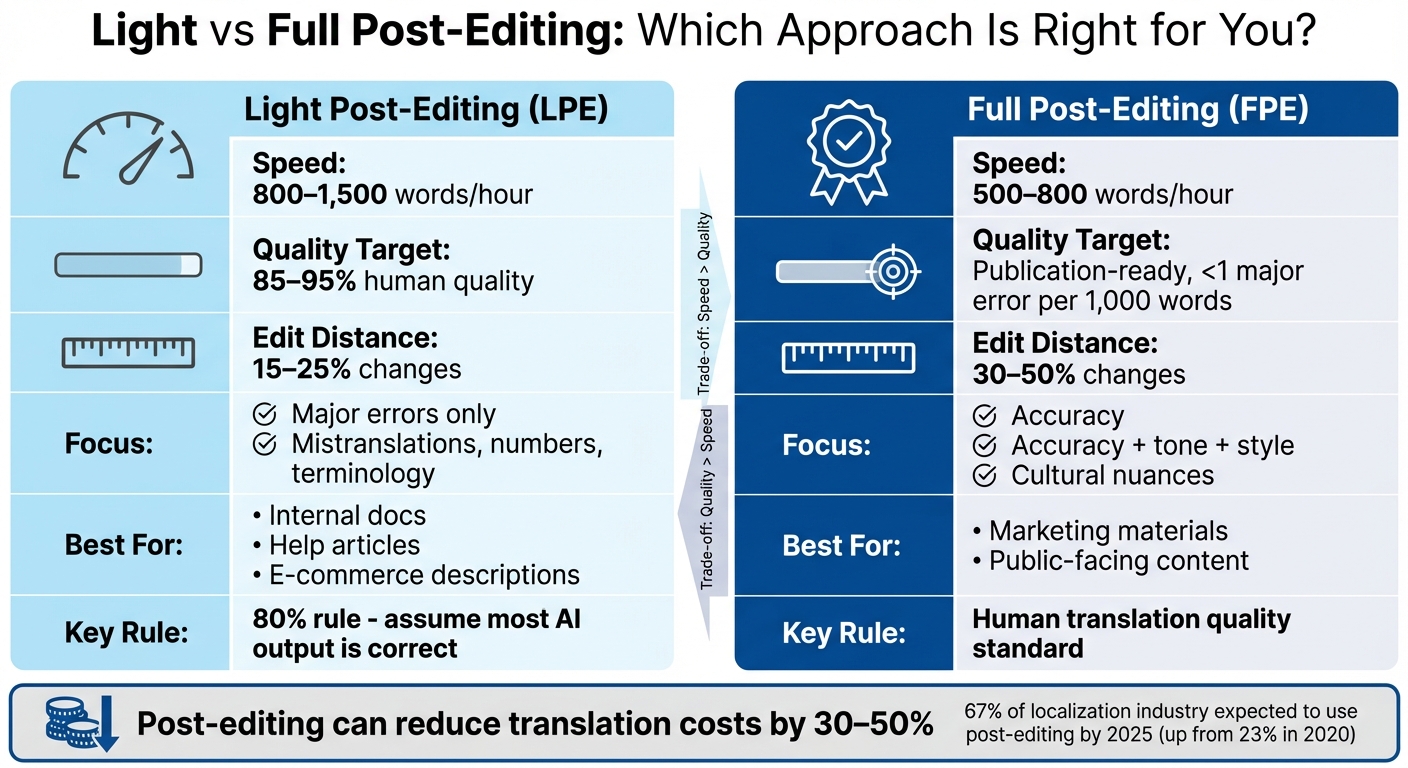
Light vs Full Post-Editing: Speed, Quality, and Cost Comparison
Automated post editing of machine translation output with generative AI
sbb-itb-a759a2a
Light Post-Editing Checklist
Light post-editing is all about making AI translations clear and accurate without losing the speed advantage of machine translation. As Crowdin puts it:
"Light post-editing focuses on correcting major errors... the main goal is to produce understandable and accurate content".
With this method, translators can handle 800–1,500 words per hour - about 2–3 times faster than traditional translation methods. To stay efficient, stick to the 80% rule: assume most of the AI output is correct and focus only on fixing errors that make the text confusing or inaccurate. Then, tackle specific types of mistakes to quickly improve clarity and accuracy.
Fix Grammar and Spelling Errors
Grammar and spelling are key to ensuring your translation is clear and reliable. Start with automated QA tools in Translation Management Systems to catch objective issues like double spaces, missing punctuation, incorrect numbers, or spelling mistakes. These tools can quickly highlight obvious problems.
Prioritize fixing errors that impact meaning - like mistranslations, omissions, or incorrect proper nouns. Be on the lookout for common AI translation quirks, such as incorrect adjectives, possessive pronouns, or idiomatic expressions that might need rephrasing. Double-check that numbers, dates, and proper nouns match the source text. Also, address inconsistencies in spacing, capitalization, and punctuation, which are frequent in AI-generated content. The goal is to fix anything that affects understanding while skipping minor stylistic details.
Check Sentence Structure
Once basic errors are fixed, focus on improving sentence structure for better flow. AI translations often sound stiff or overly literal, so adjust these to make the text more natural. Simplify complex sentences and clarify unclear references. For example, a sentence like "The application will be terminate when the error is occurred in the system" should be revised to "The application terminates when an error occurs in the system".
Don’t throw out AI-generated text entirely. Instead, tweak only the parts that hinder clarity while keeping the accurate portions intact. If fixing a section takes more effort than re-translating it, mark it for rework rather than wasting time.
Stick to a 15%–25% change rate - this means altering no more than a quarter of the text. This keeps your focus on structural issues that genuinely impact meaning rather than aiming for perfection.
Improve Readability
Making the text easier to read ensures it communicates effectively without slowing down your workflow. Adjust word choice and phrasing to improve flow for English readers, but only when absolutely necessary. The goal of light post-editing isn’t to create polished, publication-ready content - it’s to make the text clear and understandable. If the AI output is accurate and reasonably clear, leave it alone to maintain speed.
Set clear editing guidelines to avoid over-editing. This prevents wasting time on text that already conveys the intended meaning. For content like internal documentation, help articles, or e-commerce descriptions, basic clarity is often enough.
| Error Type | Action for Light Post-Editing |
|---|---|
| Spelling/Typos | Fix all |
| Wrong Terminology | Fix all |
| Awkward Phrasing | Fix only if it obscures meaning |
| Tone/Style | Ignore |
| Missing Information | Fix all |
To boost your speed, master keyboard shortcuts for navigating between segments and accepting translations. This efficiency-focused approach makes light post-editing perfect for high-volume tasks that need quick results.
Full Post-Editing Checklist
Full post-editing takes AI translations to the next level, creating content that meets the standard of human translation for public-facing use. Building on the foundation of light post-editing, this process ensures the translation aligns perfectly with tone, style, and brand voice. While it’s a more time-intensive task - handling about 500–800 words per hour compared to 800–1,500 for light post-editing - it produces polished, publication-ready results. Full post-editing focuses on refining every detail, from translation accuracy to cultural nuances, to achieve a final product that meets the industry benchmark of fewer than one major error per 1,000 words.
Here’s how to ensure your translation is flawless.
Verify Translation Accuracy
Start by reviewing the AI translation alongside the original text, segment by segment, using Computer-Assisted Translation (CAT) tools. This side-by-side comparison makes it easier to catch mistranslations, omissions, or additions that could alter the original meaning. Double-check details like numbers, dates, and proper nouns to ensure accuracy and avoid errors caused by AI hallucinations or incorrect formatting. Use your approved glossary or terminology database to confirm that industry-specific terms are translated correctly. Pay special attention to idioms, metaphors, and cultural references, as these are often translated literally rather than in context. Frameworks like MQM can help you categorize and assess errors based on their severity and type.
Maintain Consistent Terminology
Consistency is crucial for creating a professional and cohesive translation. A project-specific glossary serves as the go-to resource for approved translations of key terms, product names, and specialized vocabulary. Translation Memory (TM) databases can ensure repeated segments are translated consistently. Before starting the translation process, provide the AI engine with glossaries and style guides through context injection. This preparation can improve the initial output and reduce the post-editing workload by 20–40%. Use automated QA tools within your CAT software to flag issues like terminology mismatches, missing punctuation, or formatting errors. Additionally, create "do-not-translate" lists for brand names and technical terms - for instance, product names like "iPhone" and terms like "API" should remain unchanged. Finally, monitor your edit distance (the percentage of changes made to the AI output). For full post-editing, a typical edit distance ranges from 30–50%, giving you insight into how much refinement is needed and highlighting recurring terminology issues.
Once terminology is consistent, the next step is tailoring the tone and style to fit the audience.
Match Tone and Style
Fine-tuning tone and style elevates a translation from technically accurate to truly engaging. Develop a style guide that outlines the required tone - whether formal, conversational, or technical - and specifies preferred sentence structures and brand conventions. Smooth out rigid or awkward phrasing for a more natural flow. Adjust the language register, such as pronouns, honorifics, and levels of formality, to meet the expectations of your target audience. For high-profile content like marketing materials, these adjustments are essential to ensure the message resonates. Localize idioms, metaphors, and cultural references to make them relatable to the audience. As Dynamic Language emphasizes:
"Context is King".
Train your team to focus on the intent behind the AI-generated content rather than simply correcting surface-level errors. Avoid scrapping the AI output entirely, as this undermines the efficiency and cost benefits of the process. Instead, make focused edits that retain the strengths of the AI translation while addressing its weaknesses.
Pre-Editing Preparation Checklist
Getting your content ready before running it through AI translation tools is a crucial step. Why? Because the quality of the translation depends heavily on the quality of the input. A single error in your source text can snowball into multiple mistakes across different target languages. By preparing your content properly, you can reduce translation errors and make post-editing much smoother.
Here’s how to fine-tune your source text for better AI translation results.
Simplify Source Text
Start by running your text through automated grammar and spell-check tools. Errors in spelling, grammar, or punctuation can multiply across translations. Break down long, complex sentences and eliminate vague references to ensure the AI understands your content clearly. For example, instead of writing:
"The application, which was developed by our team over several months and incorporates feedback from multiple stakeholders, provides users with enhanced functionality,"
try:
"Our team developed this application over several months. It improves functionality using stakeholder feedback."
Ambiguity is another issue to tackle. If your sentences rely on unclear pronouns like "it", "this", or "they", rewrite them to clarify what’s being referred to. Consistency is also key - standardize the terminology throughout your document. Mixed word choices force the AI to guess, leading to inconsistent translations. Avoid slang, jargon, or overly technical terms unless you’ve clearly defined them in a glossary.
Once your text is simplified and polished, move on to standardizing your language with a glossary.
Create a Terminology List
A glossary is your go-to tool for keeping key terms consistent. It acts as a guide for how acronyms, industry-specific terms, and "Do Not Translate" (DNT) items should be handled. Inconsistent terminology is a major reason for translation rework, accounting for about 15% of localization costs.
Your glossary should include:
- Key terms: Especially those that are industry-specific or technical.
- Acronyms: Define how they should be treated in each target language to avoid literal, nonsensical translations.
- DNT items: Examples include brand names, product names, trademarks, and model numbers. Terms like "iPhone" or "API" should remain unchanged.
As Localize Corporation puts it:
"A good glossary identifies key terminology in your source language and communicates how you want those terms to be translated into your target languages".
By creating a glossary, you ensure your brand messaging stays consistent across all translations and regions.
Provide Context to AI Tools
Context is everything when it comes to AI translations. Giving your AI tool metadata about the audience, purpose, and platform of your content helps it go beyond literal, word-for-word translations. Share your glossaries and style guides directly with the system to lock in specific terms and avoid generic alternatives.
Be explicit about the tone and formality you need. For example, specify whether the content should be formal for technical documentation or casual for social media. Don’t forget to include regional preferences - like using "White Friday" for Middle Eastern markets instead of "Black Friday." If you have translation memory (TM) data from past projects, upload it to reinforce consistency.
Rachel Wolff, Lead Copywriter at Lokalise, sums it up well:
"Context is king in translations".
The more information you provide upfront, the less time you’ll spend fixing errors later on.
Quality Review Checklist
Ensuring your text is accurate and culturally aligned is the final step in the post-editing process. This stage is about polishing every detail to perfection, so your audience gets a clear, error-free message. A strong quality review can help avoid expensive mistakes. Industry benchmarks suggest that top-quality content should have fewer than one major error per 1,000 words. Here's how to meet that standard.
Complete a Final Proofread
Start by reviewing the entire text for accuracy. Double-check that numbers, dates, and proper nouns align with the original source. For instance, ensure "4/7/2026" in the source isn't misinterpreted as "July 4th." Measurements should use imperial units like feet, pounds, and Fahrenheit where applicable.
Next, confirm that technical terms are consistent with your glossary. Then, address grammar and mechanics - correct spelling, punctuation, and any language-specific issues. Awkward sentences? Rephrase them for smoother readability.
Leverage QA tools to catch issues like double spaces, inconsistent capitalization, or broken tags. As the IntlPull Team points out:
"The biggest efficiency killer in MTPE is editors who delete the machine translation and translate from scratch".
Stick to targeted corrections instead of overhauling the entire translation. This keeps the process efficient while maintaining quality.
Check Cultural Appropriateness
AI translations often miss cultural subtleties that could confuse or offend your audience. Review idioms, metaphors, and humor to ensure they make sense to American English speakers. Also, check that visual elements - like colors, symbols, or emojis - carry the right meaning.
Make sure the tone fits the context. For instance, a casual tone works for social media, while legal documents require a formal approach. Confirm that dates use the MM/DD/YYYY format, times are written in the 12-hour clock with AM/PM, and currency is displayed correctly (e.g., $1,234.56). Even when translating into English, cultural alignment is key.
Review SEO Elements
Once linguistic and cultural factors are addressed, focus on optimizing for search engines. Localize meta tags rather than translating them directly. Title tags should use U.S.-specific keywords, stay under 60 characters, and place the primary keyword at the beginning. Meta descriptions should be between 120 and 160 characters and written in an engaging style.
For URL slugs, stick to American English spelling (e.g., "color" instead of "colour") and include relevant keywords. Make sure headlines and body text incorporate localized keywords based on U.S. market research. Don't forget to update image alt text to boost search visibility.
On the technical side, verify that hreflang tags correctly specify en-US for American English content. Also, check that internal links lead to pages in the same language version. If you're aiming for AI-generated search results, ensure your robots.txt file doesn’t block crawlers like OAI-SearchBot or PerplexityBot.
| SEO Element | Review Criteria | Target Standard |
|---|---|---|
| Title Tag | Keyword placement & length | Fewer than 60 characters; primary keyword at start |
| Meta Description | Compelling copy & keywords | 120–160 characters |
| URL Slug | American English spelling & keywords | Short, descriptive, and free of stop words |
| Hreflang Tags | Language/region mapping | Correct en-US codes in backend |
| Internal Links | Language consistency | Links remain within the same language version |
Common Mistakes to Avoid
If you're aiming to keep your post-editing workflow efficient, it's crucial to steer clear of these common mistakes that can undermine the speed and cost-saving advantages of using AI translation.
Missing Contextual Errors
Grammar checks alone won't cut it. AI translations often stick too closely to the literal meaning, which can result in awkward or overly formal text that misses the intended message. This is especially true for idioms and metaphors - phrases that don’t have direct translations often require a human touch to make sense for an American audience.
Pay extra attention to grammatical shifts, like possessive pronouns such as "its", "his", or "her". Instead of tackling edits sentence by sentence, read entire paragraphs to grasp the broader context. Tools like live editors or Figma integrations can help by displaying translations directly in their final layout. This makes it easier to spot issues that might otherwise go unnoticed.
Contextual errors are just one piece of the puzzle. Another frequent issue stems from the quality of the source text itself.
Ignoring Source Text Problems
A poorly written source text can create a ripple effect, multiplying errors across all target languages. For instance, a single error in the source might result in ten or more errors across ten translations. To minimize this, pre-editing is key. By equipping AI tools with glossaries and style guides ahead of time, you can reduce your post-editing workload by as much as 20-40%. Carolina, a linguist at SYSTRAN, emphasizes this point:
"High-quality full post-editing actually begins with pre-editing".
For a deeper dive into pre-editing strategies, check out the Pre-Editing Preparation Checklist section.
Lastly, let's address a common misstep when working with AI-generated content.
Over-Relying on AI Output
AI output is neither flawless nor useless - it’s somewhere in between. Some editors make the mistake of blindly accepting machine translations, while others discard them entirely and start from scratch. Both approaches waste time and money.
A good rule of thumb: assume AI translations are about 80% accurate and focus on fixing critical errors. Correct mistranslations, inaccurate numbers, and terminology mistakes, but resist the urge to rewrite sentences just because you’d phrase them differently. Keep an eye on your edit distance - the percentage of changes you make. If you’re consistently altering more than 40-50% of the text, the AI quality might be too low for effective post-editing, or you might be over-editing. For light post-editing, try the "3-second rule" - if an error isn’t obvious within three seconds, move on to stay productive.
Here’s a quick guide to help you decide what to fix:
| Error Type | Severity | Fix in Light PE? | Fix in Full PE? |
|---|---|---|---|
| Mistranslation | Critical | Yes | Yes |
| Incorrect Numbers/Dates | Critical | Yes | Yes |
| Terminology Violation | Major | Yes | Yes |
| Awkward Phrasing | Minor | Only if unclear | Yes |
| Stylistic Preference | Minor | No | Only if brand-critical |
Conclusion
AI translations have become a cornerstone of global content delivery. By 2025, a striking 67% of the localization industry is expected to rely on post-editing workflows - an impressive jump from just 23% in 2020. This shift highlights the growing importance of having a well-structured post-editing process.
The checklists in this guide offer a practical framework that blends AI-driven efficiency with the precision of human refinement. By tailoring your editing approach to the content type, fine-tuning your source text, and steering clear of common missteps like over-editing, you could cut translation costs by 30–50% without compromising on quality. While AI handles about 99% of the initial translation work, it’s that final 1% of human input that elevates a basic translation into polished, publishable content.
Start small: pick one checklist - whether it’s pre-editing or quality review - and observe how it affects your workflow. Track your edit distance, measure time savings, and refine your strategy based on the results.
FAQs
How do I choose between light and full post-editing?
Light post-editing involves making small adjustments to ensure the translation is clear, accurate, and grammatically sound. It works best when speed is a priority and slight imperfections are acceptable.
Full post-editing goes much deeper, refining the text to enhance fluency, style, and cultural relevance. This approach is ideal for important content, such as official documents, where precision and a polished finish are crucial.
What should I do if the AI translation seems wrong but the source text is unclear?
If the AI translation feels off and the source text isn’t clear, take the time to review and refine it. Your goal is to resolve any ambiguities and ensure the translation accurately conveys the intended message. Human input is crucial for fixing mistakes, fine-tuning subtleties, and aligning the translation with the proper context - especially when the original text is vague or confusing.
How can I measure if post-editing is still saving time and money?
Tracking key metrics is essential for understanding the value of post-editing compared to traditional translation methods. Focus on metrics like time spent on post-editing versus initial translation and compare the associated costs. This helps gauge whether the process is more efficient and cost-effective.
To measure efficiency, assess whether post-editing reduces project timelines and expenses while still delivering high-quality results. It's also critical to regularly review quality metrics and analyze how much human intervention is required. This ensures the process stays cost-effective without sacrificing accuracy or precision.