AI analytics transforms your CMS into a powerful tool that provides real-time insights, automates repetitive tasks, and personalizes user experiences through AI content optimization. By integrating AI, you can improve traffic, streamline workflows, and make data-driven decisions faster. Here’s what you’ll learn:
- Real-time insights: Track metrics like clicks, scroll depth, and conversions instantly without waiting weeks for data.
- Automation: AI handles keyword research, metadata creation, SEO audits, and more - saving time and reducing manual work by up to 40%.
- Personalization: Deliver tailored content based on user behavior, boosting engagement rates by up to 20%.
- Predictive analytics: Forecast trends and identify opportunities before creating content, increasing organic traffic by 30% in six months.
Setting up AI analytics is straightforward. Check CMS compatibility, configure tools like Google Analytics 4, and validate your setup through testing. Advanced features like automated A/B testing and enterprise-scale dashboards help refine strategies and scale efficiently. The tools are ready, and the results speak for themselves - start now to stay ahead in the AI-driven content landscape.
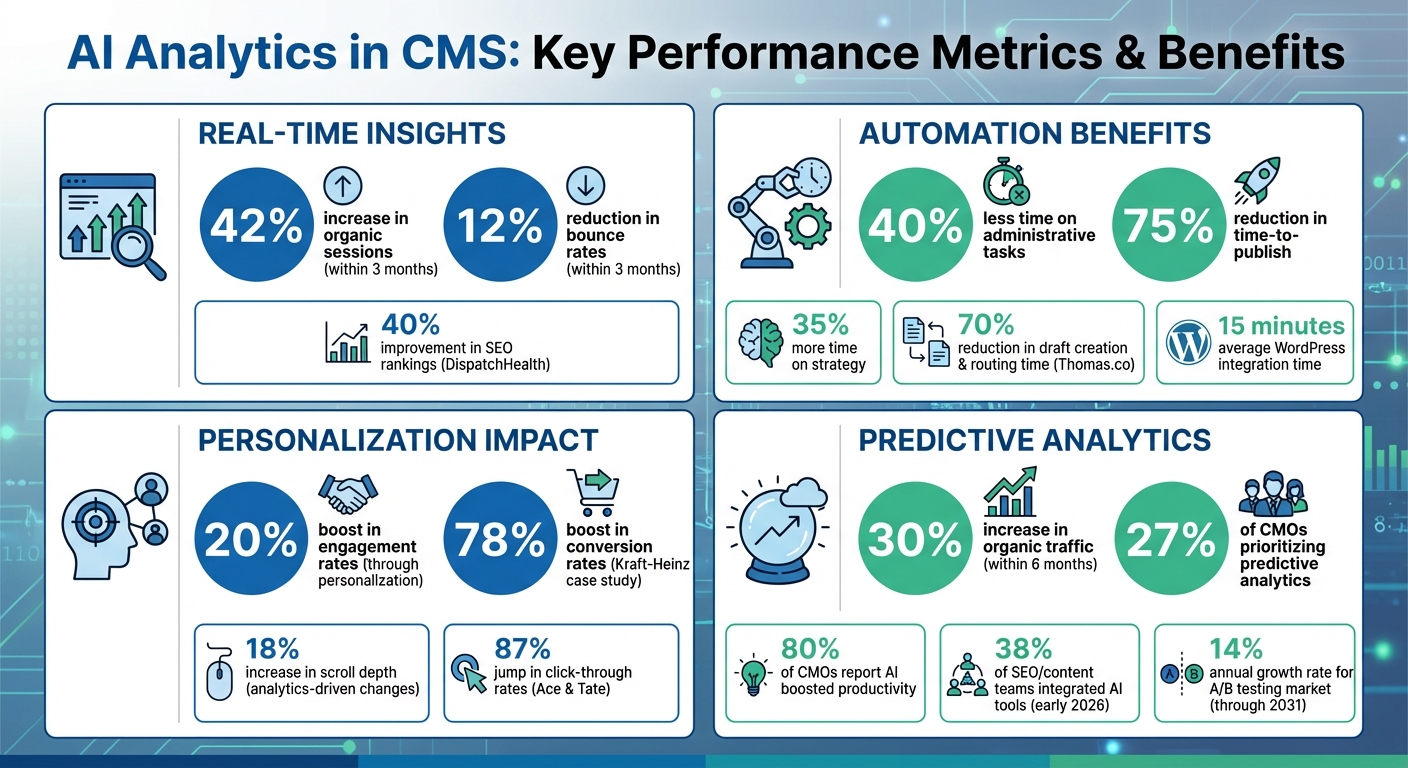
AI Analytics Impact: Key Performance Metrics and Benefits for CMS
AI in CMS: How to Get Started Today?
To implement these insights, you can leverage advanced AI tools for blog content creation to streamline your workflow.
sbb-itb-a759a2a
Benefits of AI Analytics in CMS
Turn your CMS into a powerhouse that drives measurable improvements in speed, automation, and tailored user experiences.
Real-Time Performance Data
Traditional analytics often leave you waiting for insights, but AI analytics provides instant access to key engagement metrics like time on page, click-through rates, and social shares. With these real-time insights, you can act quickly to replicate what’s working while your content is still relevant.
The benefits go beyond just speed. For instance, an AI-powered scorecard increased organic sessions by 42% and reduced bounce rates by 12% within three months.
AI also excels at catching problems early. It can flag dips in rankings, traffic, or engagement, helping you address issues like outdated information or broken links before they escalate. This proactive approach prevents the slow decline that might go unnoticed with traditional tools.
"Content performance data will provide new vital KPI metrics like image impressions, clicks, and click-through rates, to determine which placements or content types are performing best."
- Sanjay Vachani, Senior Director of Product Marketing, Adobe
But real-time insights are just the beginning. AI also eliminates the need for time-consuming manual adjustments.
Automated Content Optimization
Routine SEO tasks can eat up valuable time, but AI analytics automates processes like keyword research, metadata creation, and SEO content structure audits. This frees your team to focus on creative and strategic work. In fact, teams using AI-enhanced CMS platforms report spending 40% less time on administrative tasks and 35% more time on strategy.
AI goes a step further by analyzing content elements to determine what drives conversions. For example, Adobe’s generative AI evaluates images for attributes like color, tone, and emotional impact, helping marketers understand how visuals influence engagement and sales.
Automation doesn’t stop there. AI can also detect "content decay", identifying underperforming pieces and suggesting updates or expansions before traffic takes a hit. With these optimizations in place, AI lays the groundwork for even more advanced features like personalized user experiences.
Personalized User Experiences
In today’s digital landscape, generic content just doesn’t cut it. AI analytics uses data like clicks, scroll patterns, and navigation behavior to deliver content tailored to each user’s intent. Personalized content delivery has been shown to boost engagement rates by up to 20%. Whether it’s product guides, pricing information, or educational resources, AI ensures visitors see what’s most relevant to them.
This personalization happens seamlessly. The system learns from every interaction, constantly refining its understanding of what resonates with different audiences. With 80% of CMOs stating that AI has boosted productivity in their organizations, it’s clear that personalization offers a competitive edge. Businesses that embrace it are positioning themselves to lead, while those that don’t risk falling behind.
Setting Up AI Analytics in Your CMS
You don’t need to be a tech wizard to get AI analytics up and running in your CMS, but it does require careful attention to detail. Here’s a straightforward guide to help you integrate AI analytics into your CMS effectively.
Step 1: Check CMS Compatibility
Before diving in, make sure your CMS can support AI analytics. Popular platforms like Shopify, Wix, and Squarespace usually have built-in settings - often under "Preferences" or "External Services" - where you can add tracking IDs. For WordPress and Drupal, plugins like MonsterInsights or specific modules are your go-to for connecting AI tools. If you’re using a headless CMS, check for API and webhook support or look for custom fields like "Custom HTML" to set up integrations.
Keep in mind, WordPress integrations can often be completed in about 15 minutes, but headless CMS setups might take anywhere from 1 to 4 hours and could require a developer’s help. To avoid unnecessary manual coding, search your CMS’s official marketplace for the exact AI tool you plan to use.
Step 2: Configure Analytics Tools
Once you know your CMS is compatible, it’s time to configure your analytics tool. Start by generating an API key and granting only the permissions you need. For more advanced setups, consider creating structured data pipelines to simplify the process. Many tools, like Google Analytics 4, provide "G-" tracking IDs that can be directly added to your CMS settings.
If your platform supports enhanced measurement, enable it to automatically track actions like scrolling, outbound clicks, and site searches. Automating your publishing and analytics processes can save a lot of time - some companies report reducing their time-to-publish by as much as 75%. Don’t forget to use debugging tools to check that your API connections are working correctly.
Step 3: Test and Validate Your Setup
Before going live, always test your analytics setup in a staging environment. This helps you catch any formatting issues or API errors before they affect your actual data. Create a sample post with unique placeholders to ensure all fields - like AI-generated metadata, slugs, and schema markups - display correctly. Use browser developer tools, such as the Network tab, to verify that data packets are being sent during interactions.
Most analytics platforms offer real-time reports that show whether data is being collected, typically starting within 30 minutes of setup. If you’re using Google Tag Manager, enable preview mode to debug tag firing and check that triggers work as intended. Browser extensions like Google Tag Assistant can also help visualize data exchanges and spot errors. Some AI analytics providers even include a "Verify Integration" button in their dashboard, letting you confirm a successful connection in just a few minutes. If data isn’t showing up, try clearing your CMS configuration cache to ensure new API keys and settings are applied properly.
Advanced Use Cases for AI Analytics
Leveraging real-time insights and automation, these advanced applications take your content strategies to the next level. With a solid AI analytics foundation, these tools can refine decision-making, streamline operations, and scale efforts - all without increasing team size.
Automated A/B Testing
Traditional A/B testing can be tedious - manually creating variations, waiting weeks for results, and sifting through spreadsheets to identify what works. AI analytics simplifies this process by automating everything from generating variations to selecting top-performing options. Modern systems can even predict which headlines or elements will drive the highest click-through rates before they go live, and they adapt in real time based on how visitors interact with your content.
The A/B testing market is growing at a rate of 14% annually through 2031. In 2025, Kraft-Heinz utilized Contentful’s AI analytics to optimize their digital content, achieving a 78% boost in conversion rates by making real-time adjustments within their workflow.
"I don't have a dedicated person for conversion rate optimization, but I do have a team full of curious marketers and a really good CMS. That combination means we can keep testing layouts, headlines and CTAs without slowing down." - Jessie Kennedy, VP of Marketing at Brightspot
When running A/B tests, focus on one variable at a time - test either a headline or a call-to-action button, but not both simultaneously. Use duration calculators to determine how long your tests should run based on website traffic, and avoid making changes mid-test, as this can skew your data. Even small tweaks, like adjusting heading placement, can lead to measurable improvements; for example, analytics-driven changes have increased scroll depth by 18%.
Predictive Content Analytics
Predictive analytics shifts the focus from analyzing past performance to forecasting future success. By using historical data, these tools help you identify topics and trends that are likely to resonate with your audience before you even create content. AI models analyze past performance, competitor content, and search trends to guide your strategy.
Currently, 27% of CMOs are prioritizing predictive analytics to refine their content strategies. Companies leveraging AI-driven insights have reported a 30% increase in organic traffic within just six months. For instance, in 2025, Golfbreaks joined Contentstack’s AI Accelerator program, where Digital Product Owner Jack Simkins used AI to automate translation workflows and personalization, saving time and speeding up content production.
Predictive tools break down elements like headlines, images, and calls-to-action to estimate their potential effectiveness. To get started, consider testing a pilot program in one content area to validate the tool’s accuracy before rolling it out across your entire site. Keep in mind that these models rely on clean and well-structured historical data to deliver reliable predictions.
Enterprise-Scale Solutions
AI analytics isn’t just about optimizing individual elements - it can also manage complex, large-scale content operations. For teams overseeing multiple websites, AI-powered dashboards provide a centralized view of performance across your entire digital ecosystem. Platforms like Kontent.ai enable teams to use conversational AI for managing tasks, drastically reducing the need for manual edits. In 2025, Thomas.co adopted Kontent.ai’s Agentic CMS, cutting draft creation and routing time by over 70%, as noted by their Director of Content, Caitlin Meyer.
Enterprise solutions also include tools like Generative Engine Optimization (GEO) analytics, which track how AI search engines interact with your content. For example, Optimizely’s GEO dashboard monitors "Crawl-to-Refer" ratios, helping you identify if AI crawlers are engaging with your content but failing to cite it, which could indicate the need for better-structured data or schema markup. Companies like Ace & Tate have seen an 87% jump in click-through rates using AI-driven insights, while DispatchHealth improved SEO rankings by 40% after implementing targeted adjustments through Brightspot’s flexible CMS.
For those managing brand consistency across multiple platforms, modern systems offer audit tools that monitor AI usage down to individual fields, ensuring every piece of content aligns with your guidelines. As of early 2026, 38% of SEO and content teams have already integrated AI tools into their processes, making these enterprise solutions a standard part of the workflow rather than an experimental feature.
AI Blog Generator Directory for CMS Analytics
Navigating the world of AI analytics tools for CMS integration can feel like a daunting task. That's where the AI Blog Generator Directory at aibloggenerators.com comes in. This directory is a curated hub of AI-powered tools designed to streamline CMS analytics and integrate seamlessly into your content workflow. It’s all about turning AI-driven strategies into actionable results.
What the AI Blog Generator Directory Brings to the Table
This directory is packed with tools that cover every step of the content workflow - from automated writing and keyword research to multi-platform publishing and performance tracking. Many of these platforms connect directly to popular CMS platforms like WordPress, Shopify, Webflow, and Ghost using native REST API connectors, cutting out the need for manual copy-pasting.
Some standout tools include:
- Analyze AI: Tracks referrals from AI engines like ChatGPT, Perplexity, and Gemini while monitoring session volume trends over a six-month period.
- Rankology: Integrates Google Analytics 4 and Search Console, complete with a PageSpeed Insights module that caches reports for seven days.
- Geol.ai: Monitors how major AI providers (like OpenAI, Anthropic, and Google) interpret and cite your content.
In addition to analytics, the directory highlights tools that automate technical SEO tasks. For example, platforms like Clickcentric and BlogSEO can auto-generate JSON-LD schema (e.g., Article, FAQ, Breadcrumb) during publishing, which boosts your chances of earning rich snippets and improving search visibility. Some tools even include "drift monitoring" features, sending real-time alerts when your page rankings drop.
Making the Right Choice with the Directory
The directory organizes tools based on specific needs, making it easier to find exactly what you're looking for. Whether it’s automated A/B testing, predictive content scoring, or managing multiple CMS platforms, there’s something for everyone.
For instance, WordPress users looking to cut down on repetitive tasks can filter for tools like Rank Math Content AI 2.0, which offers a "Fix with AI" button to resolve failed SEO tests automatically. If you're juggling content across multiple platforms, tools like owlCMS can scrape websites for keyword discovery and create hundreds of optimized pages from a single template using AI.
Pricing information is clearly laid out, so you can plan your budget:
- Zapier: $19.99/month.
- Equally.ai: Plans range from $27/month to $197/month.
- owlCMS: Free Starter plan, with a $46/month option for up to 5,000 generations.
Many tools also offer free trials, such as Sight AI (7 days) and BlogSEO (3 days), giving you a chance to test their features before making a commitment.
"The real bottleneck is getting that article from your AI tool into your CMS - formatted correctly, with meta tags, schema markup, images, and internal links intact." - Clickcentric
With these curated solutions, managing your CMS analytics becomes a lot more straightforward and efficient.
Conclusion
AI analytics is reshaping how content teams operate by rapidly processing massive amounts of data to uncover critical insights. Tasks that used to take up 30–40% of production time are now automated, freeing up teams to focus on higher-value work. The impact is clear: metrics show notable traffic increases, and personalized content delivery has the potential to enhance engagement rates by as much as 20%.
Adapting to this AI-driven landscape requires creating citation-ready content that integrates seamlessly with AI systems. This ensures that tools like ChatGPT and Gemini can accurately reference your brand. As Webtrek emphasizes:
"AI visibility is not a template toggle - it's a governance discipline. No CMS can guarantee it on its own" - Webtrek
The best approach involves starting small - test fully automated AI blog generators on a specific content vertical. Let AI handle data-heavy tasks while your team maintains control over brand voice and accuracy. A "human-in-the-loop" model works best, combining AI content writing tools for scalability with human oversight for strategy and storytelling. Use tools like GA4 to track metrics such as scroll depth and session duration, refining your AI prompts and processes along the way.
As AI technology continues to advance, staying ahead means evolving your strategy. What feels innovative today will likely become the norm sooner than you think. By integrating AI analytics into your CMS now, you're not just improving current performance - you’re positioning your strategy for the AI-native search era. The tools are ready, the data is accessible, and the results are undeniable. The real challenge isn’t deciding if you should adopt AI analytics - it’s deciding how quickly you can start. Aligning your CMS with AI capabilities ensures your content strategy stays relevant in an ever-changing digital world.
FAQs
What data do I need before adding AI analytics to my CMS?
Before incorporating AI analytics into your CMS, start by organizing and centralizing all relevant data. Make sure the data is accurate and usable by focusing on cleaning and enriching it. Clearly outline your goals for using AI analytics - what exactly do you want to achieve? Take stock of your existing data sources and map out how they will integrate with your system.
It's also essential to perform a technical audit of your current data infrastructure. This will help you identify any gaps or areas that need improvement. Lastly, evaluate your team’s expertise to ensure they have the skills necessary for a seamless implementation.
How can I validate AI analytics tracking is working correctly?
To make sure your AI analytics tracking is functioning correctly, start by confirming that your analytics tools are accurately recording user interactions and traffic patterns. Use platforms like Google Analytics to review real-time data and double-check that the tracking code is installed properly on your site. Additionally, keep an eye on key performance indicators (KPIs) and compare them against baseline data to ensure the tracking is capturing information as expected.
How can I ensure AI-driven personalization complies with privacy regulations?
To maintain compliance while delivering personalized experiences, it's crucial to respect user privacy. Here's how you can strike that balance:
- Get clear user consent: Always ensure users explicitly agree to how their data will be used.
- Anonymize and aggregate data: This prevents individual users from being identified.
- Keep up with privacy laws: Regulations like GDPR and CCPA are constantly evolving, so staying informed is key.
- Leverage privacy-focused technologies: Tools like encryption and secure storage can safeguard sensitive information.
By following these steps, you can create tailored experiences without compromising user trust or running afoul of regulations.