Struggling with spam on your WordPress site? AI-powered moderation plugins can save you time and improve content quality by detecting spam, toxic comments, and harmful links. These tools analyze intent, tone, and context, offering real-time, automated protection across hundreds of languages.
Key Plugins to Consider:
- Akismet Anti-Spam: Reliable for spam and malicious link detection. Free for personal use; paid plans start at $5/month.
- Moderation API Plugin: Handles toxicity, NSFW content, and personal data protection. Free for up to 500 messages/month.
- AI Comment Guard: Offers custom prompts and supports multiple AI models like GPT-4. Free plugin; API costs apply.
- Custom API Integrations: Ideal for developers needing tailored workflows using tools like OpenAI or CleanMod.
Quick Comparison:
| Plugin | Focus | Cost | Complexity |
|---|---|---|---|
| Akismet Anti-Spam | Spam & links | Free/$5+ | Low |
| Moderation API Plugin | Toxicity, NSFW, PII | Free/paid tiers | Medium |
| AI Comment Guard | Custom AI moderation | Free plugin + API costs | Medium |
| Custom API Integrations | Tailored moderation | API costs only | High |
Tip: Start with a free tier or plugin and test AI content optimization settings before fully automating. Choose a plugin based on your site's traffic, content needs, and budget.
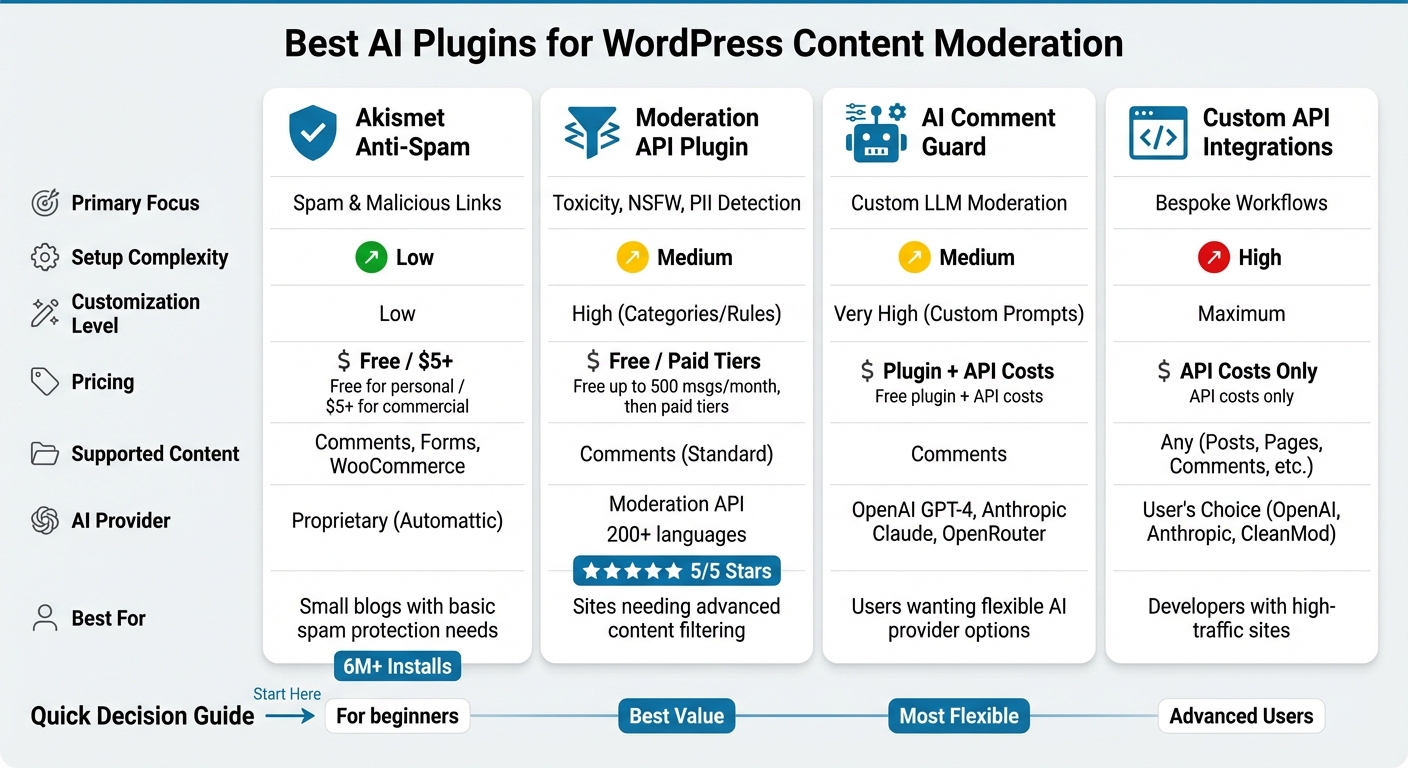
WordPress AI Moderation Plugins Comparison: Features, Pricing, and Complexity
Why WordPress Sites Need AI Moderation Tools
Common Content Moderation Problems
WordPress sites are grappling with an escalating challenge in 2026: manual moderation simply can't keep up with the sheer volume of user-generated content. High-traffic sites often deal with hundreds or even thousands of comments daily, making real-time review nearly impossible and creating massive backlogs.
Traditional keyword filters fall short because spammers have become more sophisticated. They use techniques like misspellings, character substitutions, and subtle rephrasing to bypass these filters. These systems only flag exact matches, which means they can't detect harmful comments that avoid banned phrases or catch false positives from legitimate discussions about moderation policies .
The rise of generative AI has made things even trickier. Spammers now use advanced AI tools to create thousands of comments that sound human, with proper grammar and contextual relevance, slipping past older defenses. Beyond spam, WordPress sites also face challenges like toxic behavior, harassment, and the accidental sharing of personally identifiable information (PII). Unchecked comment sections can quickly become a breeding ground for abusive language, discrimination, or privacy violations. This not only damages your site's reputation but can also hurt its SEO rankings if search engines associate your site with low-quality content .
With these persistent problems in mind, smarter, more adaptive solutions are essential. That’s where AI-powered moderation steps in.
How AI Improves Moderation
AI moderation tools offer a game-changing solution for WordPress sites, going beyond simple keyword matching to analyze patterns, tone, and context. These tools focus on identifying intent and sentiment, making them far more effective at catching harmful content .
Here’s how it works: when a user submits a comment, the AI plugin steps in before it even reaches the WordPress database. The comment is sent securely via HTTPS to an external AI engine, such as OpenAI's GPT-4 or Anthropic's Claude. Within milliseconds, the AI analyzes the content and returns a confidence score, indicating whether the comment is spam, toxic, inappropriate, or safe. Based on this score, the plugin can automatically approve the comment, flag it for review, or block it entirely .
This system excels at handling nuance. Large language models can pick up on subtle cues like sarcasm or attempts to derail conversations - things that traditional filters would miss.
Another advantage is scalability. AI moderation works in real time and supports over 200 languages, far outpacing what human moderators could handle . With accuracy levels now comparable to human moderation, these tools offer consistent, 24/7 protection against both obvious spam and more subtle policy violations.
| Feature | Traditional Filters | AI-Based Moderation |
|---|---|---|
| Detection Method | Exact keyword matching | Pattern and intent recognition |
| Scalability | Low (requires manual oversight) | High (automated real-time processing) |
| Language Support | Limited/Manual | 100-200+ languages automatically |
| Context Awareness | None | High (understands sarcasm/nuance) |
| Spam Type | Bot-like/Repetitive | Human-sounding/AI-generated |
The most effective approach combines AI with human oversight. AI handles the majority of moderation tasks, while human reviewers step in for borderline cases. This hybrid model blends the speed and efficiency of automation with the nuanced decision-making of human moderators, ensuring WordPress plugins can deliver reliable and accessible moderation solutions .
sbb-itb-a759a2a
Best AI Plugins for WordPress Content Moderation
Check out these AI plugins designed to protect your WordPress site. They offer a range of features, from tackling spam to identifying toxic behavior and AI-generated content. Here's a closer look at some top options:
Akismet Anti-Spam
Akismet is a go-to solution for WordPress spam protection, with over 6 million installations and a 4.7/5 star rating. It scans every comment and form submission against a global database that evolves by learning from spam patterns across countless websites.
This plugin is excellent at spotting malicious links and bot-generated spam. It also provides a status history for each comment, helping you understand why something was flagged. Plus, it exposes hidden or misleading URLs that spammers often try to sneak in. Akismet integrates seamlessly with WordPress's moderation tools and is available in 74 languages.
Pricing: Free for personal blogs, while commercial sites need a paid subscription. However, if you're looking for moderation that includes detecting toxicity or offensive language, you might need a different solution.
Moderation API Plugin
The Moderation API Plugin goes beyond spam detection, addressing harmful content like bullying, discrimination, NSFW material, personally identifiable information (PII), and toxic language across more than 200 languages.
What makes this plugin stand out is its adaptability. You can set up custom AI rules and choose whether flagged content is deleted automatically or held for manual review. This approach helps you refine your moderation over time while understanding why content was flagged.
"The moderation API plugin has been transformative for my company. We no longer have to spend HOURS a week moderating comments on our articles." - Verified User, WordPress.org
It also supports WordPress multisite networks. The free tier covers up to 500 messages per month, and the plugin boasts a perfect 5/5 star rating on WordPress.org.
AI Comment Guard
AI Comment Guard offers flexibility by letting you choose the AI model for analyzing comments. It supports OpenAI's GPT-4, Anthropic's Claude, and OpenRouter, enabling you to switch providers based on your needs or budget.
The plugin acts as a bridge between WordPress and these language models, sending comments to your selected provider for analysis. Its asynchronous processing ensures your site’s performance isn’t affected. You can also create custom AI prompts for precise moderation control. While the plugin itself is free, you’ll need to account for API costs from your chosen provider, so keeping an eye on your usage is important.
Custom API Integrations
For advanced and tailored moderation needs, custom API integrations provide unmatched flexibility. Developers managing high-traffic sites or agencies with specific workflows can use REST APIs and SDKs from providers like OpenAI, Anthropic, or CleanMod to design custom moderation systems.
These integrations allow you to create moderation workflows that fit your exact needs, such as routing different content types through specific AI models or integrating moderation data into analytics dashboards. While this approach requires technical expertise, it offers full control for large-scale operations.
CleanMod stands out as a notable option. It works alongside Akismet, handling toxicity detection and identifying AI-generated comments while Akismet tackles spam. CleanMod also offers a free plan for testing, making it a great choice for developers experimenting with custom setups before committing to a paid version.
Plugin Feature Comparison
When deciding on the right moderation plugin, it's important to match the tool's features with your specific needs, technical skills, and budget. Whether you're looking for straightforward spam filtering or more advanced moderation capabilities, the comparison below highlights the key differences to help you make an informed choice.
Feature Comparison Table
| Feature | Akismet Anti-Spam | Moderation API Plugin | AI Comment Guard | Custom API Integrations |
|---|---|---|---|---|
| Primary Focus | Spam & Malicious Links | Toxicity, NSFW, PII | Custom LLM Moderation | Bespoke Workflows |
| Setup Complexity | Low | Medium | Medium | High |
| Customization | Low | High (Categories/Rules) | Very High (Prompts) | Maximum |
| Pricing | Free / $5+ | Free (500 msgs) / Paid Tiers | Free Plugin + API Costs | API Costs Only |
| Supported Content | Comments, Forms, WooCommerce | Comments (Standard) | Comments | Any (Posts, Pages, etc.) |
| AI Provider | Proprietary (Automattic) | Moderation API | OpenAI, Anthropic, OpenRouter | User's Choice |
Insights on Each Plugin
Each plugin comes with its own strengths, tailored to different types of moderation needs:
- Akismet Anti-Spam: This is a straightforward, plug-and-play solution for tackling spam and malicious links. It's a reliable option for basic spam moderation. However, as Kevin MacGillivray, Chief Marketing Officer at Pressable, points out:
"Akismet handles spam well, but it may not be the best choice for sites that need nuanced or custom content policies".
- Moderation API Plugin: Ideal for managing toxic behavior, NSFW material, or personal information leaks. Its multisite network support is particularly useful for larger or international sites. Plus, the free tier (covering up to 500 messages per month) allows you to test its capabilities before investing in a paid plan.
- AI Comment Guard: This plugin excels in flexibility, offering custom prompts and the ability to choose your AI provider. While API usage may add to the overall cost, its asynchronous processing ensures your site remains fast and responsive.
- Custom API Integrations: Best suited for developers who need highly tailored moderation workflows. This option provides maximum flexibility, enabling you to go beyond standard comment moderation.
Each of these tools serves a specific purpose, so your choice will depend on the level of customization, complexity, and moderation scope you require.
Conclusion and Recommendations
Choosing the right AI moderation plugin depends on your site's specific needs, technical know-how, and budget. For smaller blogs with modest traffic, Akismet Anti-Spam is a solid choice. It offers dependable spam protection starting at just $5/month, making it a budget-friendly option. If your site requires advanced moderation, such as filtering toxic language or personally identifiable information, the Moderation API Plugin is worth considering. It includes a free tier that covers up to 500 messages per month, with paid plans available for higher usage. These options provide effective solutions for both small-scale and high-traffic websites.
If flexibility is a priority, AI Comment Guard is a standout option. It lets you create custom prompts and choose from various AI providers, including OpenAI, Anthropic, and OpenRouter. This flexibility allows you to select the most cost-efficient model for your needs, which is especially important when processing costs can range from $0.003 to $0.08 for a typical 1,000-word blog post using AI models like GPT-3.5 Turbo. To avoid unexpected expenses, keep a close eye on API usage.
For high-traffic community forums, consider moderation tools with behavioral profiling features. Meanwhile, e-commerce sites benefit most from plugins that prioritize review authenticity and fraud detection. Kevin MacGillivray, Chief Marketing Officer at Pressable, highlights the importance of modern content writing tools:
"In 2025, human moderation doesn't scale, and old-fashioned keyword filters are easy to evade".
This insight emphasizes why it's crucial to monitor automated tools carefully. Testing moderation settings in preview or log mode before fully automating them is a smart approach. This allows you to fine-tune confidence thresholds, ensuring harmful content is flagged while legitimate users aren't mistakenly blocked.
FAQs
Can AI moderation mistakenly block real users?
AI moderation systems sometimes mistakenly flag legitimate users due to false positives. That said, these systems are constantly evolving to reduce errors and improve precision. Frequent updates and careful adjustments aim to strike a better balance between maintaining effective moderation and providing a smoother user experience.
How do these plugins handle privacy and PII?
These plugins are built to automatically identify and mask personally identifiable information (PII) in comments and forms. This functionality helps businesses stay aligned with privacy laws like GDPR while also protecting user data. By safeguarding sensitive information, they provide a secure yet seamless experience for users.
What does AI moderation cost per month?
AI moderation services generally cost about $1 for every 1,000 comments moderated each month. However, the exact pricing can differ based on the platform or service provider.